Convergence 2025 is back: Why AI + ERP leaders should meet us in Miami

Microsoft Convergence is Back

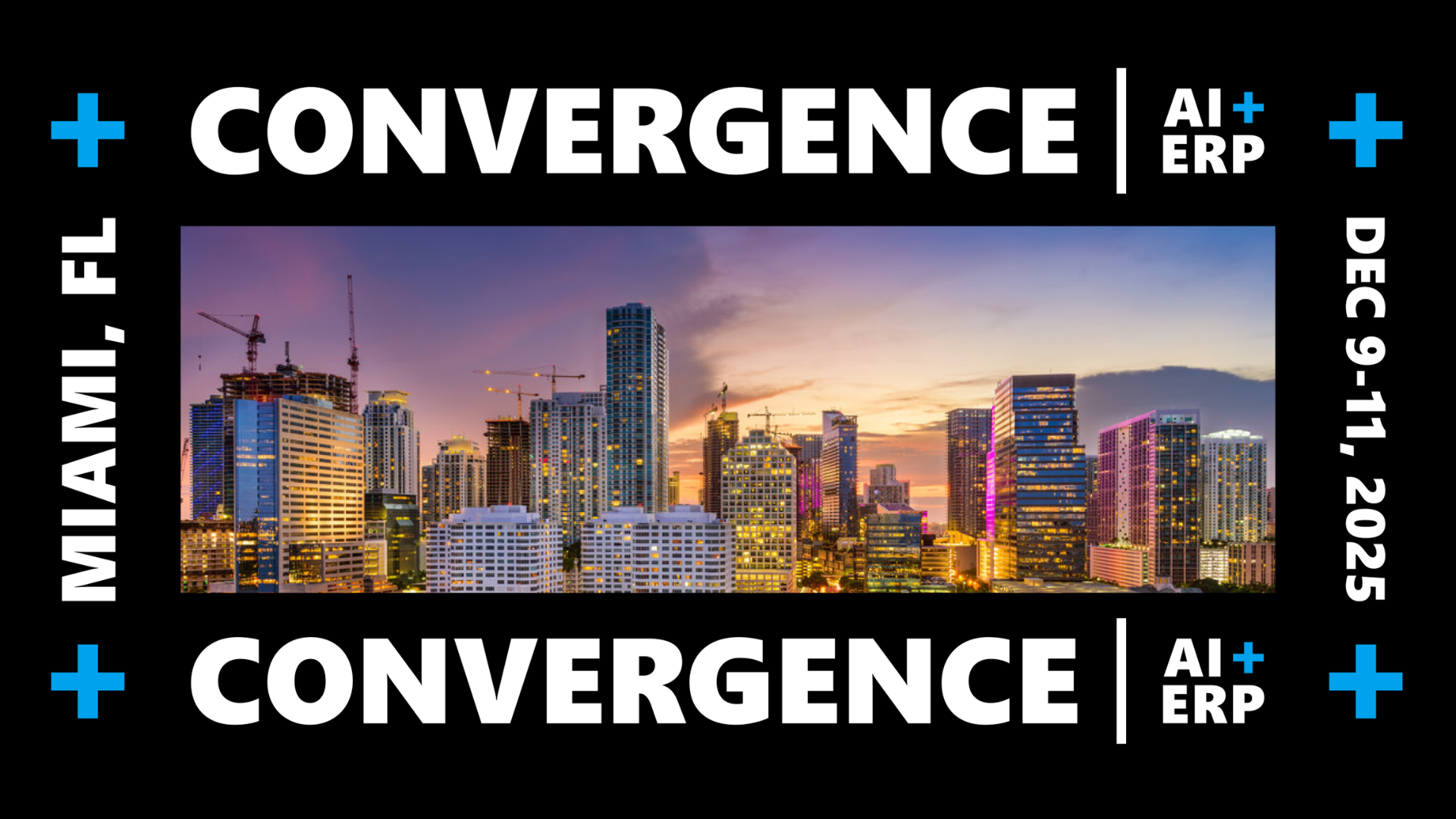
Convergence is returning…and the spotlight is squarely on how AI is changing ERP. From Copilot-driven processes to real-world transformation stories, Convergence 2025 brings enterprise leaders, Microsoft product teams, and partners together in Miami, December 9–11. A Copilot/AI deep dive half-day is planned for December 12.

What is Convergence 2025?

Convergence is the revived Microsoft-aligned conference dedicated to AI + ERP for the enterprise. The official site positions it as the next chapter after Convergence 2015, when Microsoft highlighted innovations like Power BI and the shift to cloud. A decade later, the theme is AI-First, with Copilot at the center. Expect general sessions, hands-on breakouts, executive roundtables, and an expo hall.

Why is Convergence back now?

The Dynamics ecosystem is moving from “cloud-first” to AI-first operations—forecasting, planning, finance automation, and service are being redesigned around Copilot and intelligent automation. Convergence is designed to concentrate those learnings and roadmaps in one place, with direct access to Microsoft leaders, MVPs, and enterprise practitioners.

Why Sunrise is sponsoring Convergence 2025

For Sunrise, Convergence has been part of our story for decades. We’ve attended and presented at past Microsoft Convergence events going back to the early 2000s, when the focus was on helping customers get the most from Microsoft Dynamics AX and the early days of cloud ERP. Those gatherings were where we built many of our long-standing relationships with Microsoft leaders, partners, and customers, and where we helped shape conversations around industry best practices for apparel, footwear, and consumer goods.

A decade later, Convergence 2025 brings that same spirit of innovation to a new era: AI + ERP. Today, Sunrise helps brands run Dynamics 365 for Finance, Supply Chain, and Commerce—now with Copilot woven into planning, service, and analytics. This year, we’re returning as a sponsor to share what we’ve learned about putting AI to work inside real business processes. The conversation has evolved from pilot projects to production systems, and we’re excited to help customers see what’s possible.

When and where

• Dates: December 9–11, 2025 (with an optional Copilot/AI workshop day on December 12)
• Venue: Nobu Eden Roc Hotel, Miami Beach, FL
• Good to know: Book by November 14 to access group rates!

Who should attend

• CIOs and IT leaders driving AI strategy in their organizations.
• Supply chain and operations leaders modernizing planning and fulfillment.
• Finance executives pursuing close, FP&A, and control automation.
• Solution architects and technical experts building on Dynamics 365 ERP and AI/Copilot investments.

Why you should attend

• Practical AI, not fluff: Sessions emphasize viable use cases and peer experiences.
• Microsoft access: Meet product teams and leaders from Microsoft for direction and Q&A.
• Enterprise depth: Content targeted to organizations running Dynamics 365, with Business Central as a secondary focus.
• Time with Sunrise: We’ll be there! Meet us on the expo floor and in sessions to hear customer stories and AI use cases we’re developing, deploying, and optimizing.

Contact Sunrise

Get on our calendar. Schedule time to meet us at Convergence today.

Dynamics 365 license management & cleanup guide

Dynamics 365 License Management

Use this license cleanup guide to prepare for changes to Dynamics 365 license enforcement

Microsoft is introducing new tools to monitor and manage D365 licenses

Microsoft is cracking down on Dynamics 365 license enforcement. New tools and reports promise to make managing users easier, but on January 15, 2026, users who haven’t been assigned a license will lose access to their Finance and Operations production environments.

Don’t get caught by surprise! Below is a step-by-step guide on how to reconcile system users with your current licenses and subscriptions, assign named users to licenses, and ensure you’re compliant with Microsoft’s requirements.

Key dates to remember

September 1, 2025

  • Users who haven’t been assigned a license will see a notification when they log in to Dynamics 365 Finance & Operations, prompting them to contact their administrator.

November 1, 2025

  • Users who haven’t been assigned a license will lose access to their Dynamics 365 Finance & Operations production environments.

Part 1. Log in to Power Platform Admin Center (PPAC) license reporting

Find your current license utilization report here:

  1. Go to https://admin.powerplatform.microsoft.com.
  2. Make sure to toggle on the “New Admin center” look in the upper right-hand corner.
  3. Go to Licensing > Finance and Operations. By default, the form filters to your production environment.
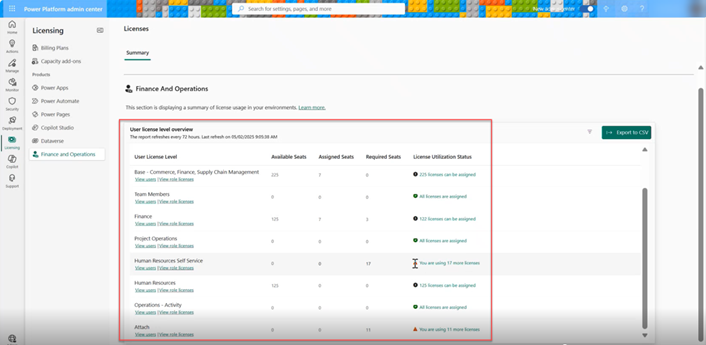
  4. Screenshot the page for easy reference. You should have a report that looks like this:
    A screenshot of the licenses summary page in Power Platform Admin Center (PPAC), showing an overview of user licenses in Finance and Operations.
  5. Look at the License Utilization Status column and refer to the chart below for what to do for each scenario:
ScenarioWhat it meansNext action
No Issues:


Available Seats ≥ Required Seats and all are Assigned

Utilization Status: “All licenses are assigned.”

You’re good to go! All available seats cover your user requirements, and every user has been assigned a license.No action required. Consider reducing your total licenses if excess capacity exists.
Fully licensed but need assignments:


Available Seats ≥ Required seats, but are not fully assigned

Utilization Status: “X licenses can be assigned.”

Sufficient licenses exist, but some users haven’t been assigned a license.Assign licenses to unlicensed users.
Under licensed:


Available Seats < Required Seats

Utilization Status: “You are using X more licenses.”

More users are triggering license requirements than you have seats for.Perform an audit: review security roles, reduce permissions or duties, or determine if more licenses are needed. Then assign licenses to users.

Note about Device licenses:

Device licenses and usage are not included in the PPAC license report. We recommend that you manually track physical device usage (such as warehouse scanners and POS terminals) and ensure purchased quantities match your needs.

What to do if you are under-licensed

Time for a true-up!

Export the PPAC license report to CSV for use in detailed analysis:

  • In the top right of the overview section, click Export to CSV.
  • The Download license information slider pop-up will appear. Click Start to generate the file and download.
  • This report will show all users and the associated license types being triggered as required.

Create a separate master list of all expected current F&O users:

  • To compare against the PPAC report, you’ll need to create a table of your current F&O users if you haven’t already. Exporting your F&O security roles can give you a base list to start. We recommend you include the following:
    • Email or user ID
    • Plain language job title and description (e.g., “Accounts Payable Clerk”)
    • Your expected license type for each user (Team Member, Operations Activity, Base Supply Chain, Base Finance, etc.)

Now you can compare the two lists:

  • Flag any specific users or roles that appear to be incorrectly assigned a higher-than-expected license.
    • For example, you might find a read-only user that shows up as requiring a full Base or Activity license. This is important because you will later investigate what F&O permissions are triggering the unnecessarily higher license.

Now that you’ve exported the PPAC license report and compared it against your list, it’s time to analyze user role permissions in Dynamics 365 Finance & Operations.

Part 2. Dynamics 365 license cleanup and reconciliation process

1. Analyze role permissions in F&O

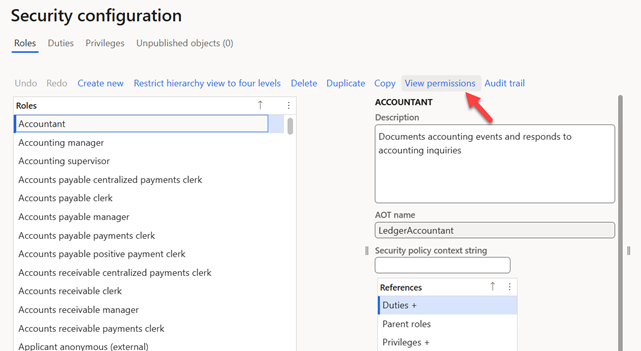
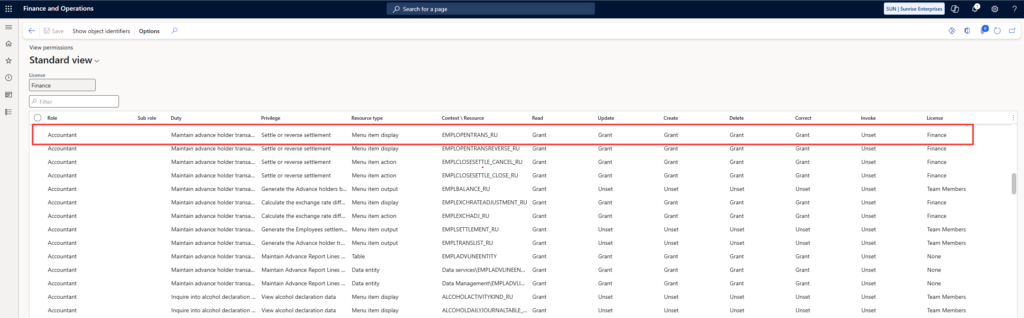
In Finance & Operations, go to System Administration > Security Configuration. Select the user role in question, click “View Permissions” and review Duties/Privileges that are contributing to the license tier:

A screenshot of the Security configuration-Roles page in Dynamics 365 Finance and Operations.

A screenshot of Finance and Operations, showing the user permissions for an Accountant role.

2. Optimize custom roles

If using custom roles, consider duplicating and modifying them to remove non-essential privileges or duties. Ensure the new role supports business needs while minimizing license impact.

3. Submit licensing disputes

If specific privileges are still triggering higher licenses and you believe they shouldn’t, document them and escalate with your partner and/or Microsoft.

Types of Dynamics 365 licenses

Below is a simplified summary of the different Dynamics 365 F&O user-based license types. For the full description of each license, refer to the latest edition of the Microsoft Dynamics 365 licensing guide: link

(Note: the above is a link to the May 2025 licensing guide. To find the latest Dynamics 365 licensing guide at any time, visit the Microsoft resource site: Licensing Documents.

License TypeDescription
Team MemberMostly read-only users. Can view data and reports. Limited transactional rights.
Activity

Approvers, warehouse, or shop floor users who interact via shared terminals or perform confirmations. Depending on access requirements, Activity license holders can also include customer service and order entry personnel.

Operations–Activity users generally are allowed to:

  • Create and edit items related to
    • Orders (sales and purchase orders)
    • Vendor maintenance
    • Warehousing (receiving and shipping)
    • Budgets
  • Record and approve:
  • Operate POS devices (depending on their role and if licensed accordingly)

Examples of allowed tasks:

  • Entering or editing sales or purchase orders
  • Modifying basic vendor or inventory details associated with an order
  • Participating in approval workflows related to order entries (within their permission scope)
  • Updating order line items under specific constraints
BaseFull or transactional access. Includes finance, inventory, or production responsibilities. Attach-type licenses are required when using multiple Base functionality areas (e.g., Finance, Supply Chain, Commerce, Project Operations, etc.).

Tips for managing your Dynamics 356 licenses

We have found the following simple tips greatly helpful:

  • Create one parent role per user job type, where possible, to simplify future license analysis.
  • Use naming conventions for custom roles that reflect the job title or team.
  • Perform all edits in a sandbox environment first, then promote to production.

Part 3. Ongoing maintenance: Review Dynamics licensing assignments in Power Platform Admin Center

Starting in 2025, Microsoft requires that all D365 Finance & Operations users be explicitly assigned a license through the Power Platform Admin Center. This ensures correct access and avoids unexpected license errors. To look up users that need to be assigned a license, follow these steps:

1. Go to https://admin.powerplatform.microsoft.com
2. Make sure to toggle on the “New Admin center” look in the upper right-hand corner.
3. Go to Licensing > Finance and Operations. By default, the form auto-filters to the production environment.
4. Review the list of users to identify those who are unassigned or incorrectly assigned.
5. To assign users, continue to the next step.

Part 4. Assign users to licenses in Microsoft 365 Admin Center

If you identify a user or group in PPAC that needs a license assigned, you’ll make the assignment in the Microsoft 365 Admin Center. Here’s how:

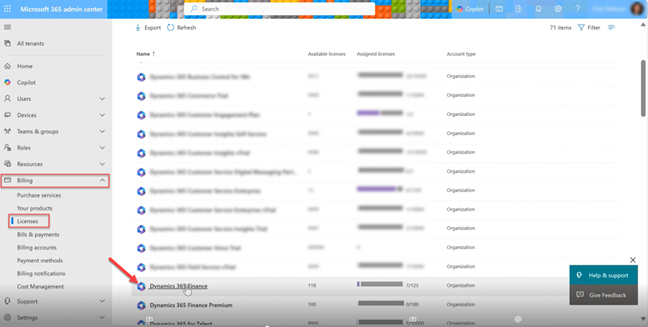
1. Go to the Microsoft 365 Admin Center (https://admin.microsoft.com> Billing > Licenses.
2. Select the desired license name, such as Dynamics 365 Finance.
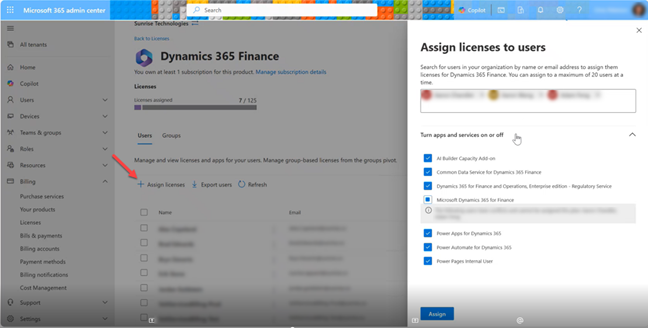
3. Select Assign licenses > add the desired user(s) to assign > click Assign.

Tip: You may want to create and then assign Entra groups for sets of users requiring the same license type.

A screenshot of the Microsoft 365 Admin Center, where users can be assigned Dynamics 365 licenses.

A screenshot of the Microsoft 365 Admin Center and screen where you assign licenses to users,

Frequently asked questions

Yes, we have seen recent inaccuracy issues with reporting in PPAC as Microsoft releases new features. The Microsoft product team is actively working on resolutions.

Microsoft is refining and restructuring PPAC and making significant changes to its layout and functionality. In the future, PPAC will be a centralized hub for managing both licenses and environments.

In the meantime, it’s critical to assign licenses to users. We recommend you independently track your expected user counts, actual system users, and assigned security roles to establish a reliable baseline to compare against PPAC’s data.

It’s important to independently track your expected user counts, actual system users, and assigned security roles to establish your license baseline for comparison against PPAC’s reports. This blog post contains detailed instructions for comparing your license actuals against what’s in PPAC. Here’s a summary of the process:

  • Create a master list of all current Dynamics users.
  • Clean up current licenses: Assign purchased licenses to your users in the Microsoft 365 Admin Center and delete expired users from the system.
  • Export the report of Dynamics users from PPAC (note: this report only refreshes every 72 hours).
  • Compare your expected users versus the list in PPAC.
  • Note and investigate any discrepancies.
  • Analyze security roles and role permissions in F&O to identify any permissions that may trigger a higher-level license (i.e., Base license versus Activity license).
  • Adjust permissions in each role as needed.
  • Re-run the PPAC report. Note: License assignments take place in real time in Microsoft 365 but it takes 72 hours for changes to be reflected in the PPAC report.

Microsoft has not yet released formal guidance on how it will check for compliance. However, at this point we recommend assuming that license validation will occur at the license type level. This is signaled by the PPAC report, which audits expected user counts by license type and outlines the number of users required per license category.

Microsoft is introducing significant enhancements to security governance in Dynamics 365 Finance and Operations, aiming to provide administrators with more robust tools for managing user roles, ensuring compliance, and optimizing licensing. These are currently in preview and expected to be released in July 2025 (Dynamics version 10.0.44). These features will greatly speed up security role creation, analysis, and adjustments.

As it specifically relates to licensing:

Microsoft 365 Admin Center:

  • Used for all licensing assignments.
  • View available licenses vs. assigned licenses.

Power Platform Admin Center (PPAC):

  • View F&O license utilization status. PPAC shows not only your available and assigned licenses, but also required licenses and suggested actions.
    • Don’t forget: Reports refresh once every 72 hours.
  • Download detailed user/role/license information.
  • View storage utilization status.

Lifecycle Services (LCS):

  • Features will be released to show license reporting from PPAC. This feature is being added to LCS because Microsoft understands that F&O customers and partners often use LCS, whereas PPAC access is often more restricted.
  • Note that in time, LCS is planned for deprecation.

Get a free license mapping assessment

Contact us to speak with a licensing expert today. We can help you prepare for Microsoft’s upcoming license enforcement changes and optimize costs.

Dynamics 365 licensing guide

Dynamics 365 Licensing Guide

Check out the latest edition of the Dynamics 365 licensing guide, released in May 2026. It’s a comprehensive resource for understanding how Microsoft licenses its suite of business applications across finance, operations, sales, customer service, and more. This educational guide explains the types of licenses available—user, device, and tenant—and outlines the latest pricing, purchase channels, capacity entitlements, and use rights. Whether you’re evaluating Dynamics 365 for the first time or expanding your current deployment, this guide will help you make informed decisions, avoid costly licensing mistakes, and align your investment with actual usage.


Do you have questions about your specific situation? Our experts can help you map out the most cost-effective way to license Dynamics 365 for your organization. Contact us for a free assessment and licensing blueprint.

Start Your Journey with Sunrise Today!

Whether you’re exploring your options for new business platforms, or ready to get started, we are trusted business partners for some of the world’s most well-known brands. With over 25 years of experience with the Microsoft stack, we can help you understand all the capabilities Microsoft has to offer.

Microsoft Inner Circle recognition

Microsoft Inner Circle Recognition

Sunrise Technologies is proud to be a recurring member of the prestigious Microsoft Inner Circle, an exclusive group that represents the top 1% of Microsoft Business Applications partners worldwide. This recognition reflects our long-standing commitment to excellence, innovation, and strategic alignment with Microsoft.

A Global Standard of Excellence

To be named to the Inner Circle, Microsoft partners must consistently deliver outstanding customer outcomes, demonstrate deep industry expertise, and drive digital transformation through the Microsoft Cloud. Year after year, Sunrise has met and exceeded these standards. As a result, Sunrise has earned a seat at the Inner Circle table—participating in strategic summits and private briefings with Microsoft executives, shaping the future of Dynamics 365, Power Platform, and AI. Sunrise’s multi-year recognition spans over 15 years of strategic growth and alignment with Microsoft since 2009.

Why It Matters

Being part of Microsoft’s Inner Circle is about more than sales—it’s about trust, impact, and shared vision. Microsoft chooses partners who:
  • Deliver measurable value with Dynamics 365 and Power Platform
  • Invest in intellectual property, like our Sunrise 365 suite
  • Collaborate closely on AI innovation and Copilot integration
  • Drive digital transformation in retail, manufacturing, and distribution
This recognition highlights Sunrise as a strategic advisor, not just a systems integrator.

What Microsoft Says

“Partners achieving the Inner Circle distinction have demonstrated an exceptional impact helping customers accelerate their AI and digital transformation with Dynamics 365 and Power Platform, and we are honored to recognize this impact. Microsoft AI Cloud Partner Program partners who achieve the Business Application Inner Circle distinction stand out for their deep AI, Cloud, and Industry knowledge. They bring specialized IP, business process, and technical expertise to customers—and help them unlock incremental business value through services and solutions.” — Peter Jensen, Microsoft Business Application Partner Strategy Lead

What It Means to Sunrise

“Being selected for Microsoft’s Inner Circle is a tremendous honor. It reflects our team’s consistent execution and deep alignment with Microsoft’s goals. As we look to the future, I’m excited by what we’ll achieve together—especially in AI and next-gen transformation.” — John Pence, Founder & President, Sunrise Technologies

Looking Ahead

Sunrise continues to evolve alongside Microsoft—bringing together cloud, data, and AI to help customers achieve more. Inner Circle provides a unique opportunity to shape product strategy, influence innovation, and ensure our clients are at the forefront of what’s next.

Tackling a tough retail implementation?

Speak with one of our retail experts today.

Microsoft Partner of the Year awards and recognition

Microsoft Partner of the Year Awards and Recognition

Microsoft Partner of the Year Awards and Recognition

Sunrise Technologies is proud to be recognized by Microsoft as one of its most accomplished global partners—earning multiple Partner of the Year wins and finalist distinctions over the past decade. These awards honor our commitment to innovation, industry expertise, and consistent delivery of impactful Microsoft solutions for enterprise brands.

Consistently Among Microsoft’s Best

Microsoft’s Partner of the Year Awards are highly competitive, with thousands of nominations submitted annually by top-performing partners across more than 100 countries. These awards recognize excellence in customer implementation and innovation using Microsoft Business Applications—particularly Dynamics 365Power Platform, and the Microsoft Cloud. Sunrise has been honored multiple times, reflecting the trust Microsoft places in our ability to drive digital transformation at scale.

Why We Stand Out

These recognitions consistently highlight our:
  • Deep industry focus – Apparel, footwear, furnishings, retail, and distribution
  • Technical leadership – Dynamics 365 Finance, Supply Chain, Commerce, and Sales
  • Customer-centric execution – Especially during rapid industry shifts (e.g., e-commerce, omni-channel)
  • Microsoft alignment and IP investment – Including our proprietary Sunrise 365 solutions

Recognized Excellence Across Categories

Reverse date order, newest first

YearStatusAward Category
2023FinalistPartner of the Year – Dynamics 365 Supply Chain
2022WinnerPartner of the Year – Dynamics 365 Sales
2021FinalistRetail & Consumer Goods Partner of the Year
2021WinnerUS Partner of the Year – Dynamics 365 Commerce
2019WinnerGlobal Partner of the Year – Dynamics 365 Finance & Operations
2017FinalistMicrosoft Industry Partner of the Year
2015WinnerUS Microsoft Dynamics AX Retail Partner of the Year
2014WinnerUS Microsoft Dynamics AX Distribution Partner of the Year
2012FinalistMicrosoft Dynamics Distribution Industry Partner of the Year

What Microsoft Says

“These partners were outstanding among the exceptional pool of nominees, and I’m continuously impressed by their innovative use of Microsoft Cloud technologies and the impact for their customers.” — Nick Parker, CVP, Global Partner Solutions, Microsoft (2022) “It’s an honor to recognize winners and finalists… These companies are building intelligent solutions, addressing complex business challenges, and making more possible for customers around the world.” — Gavriella Schuster, CVP, One Commercial Partner, Microsoft (2019)

Why It Matters

Each award reaffirms our ability to:
  • Solve industry-specific challenges with real business solutions, not just technology
  • Lead enterprise transformation with ERP, CRM, and Supply Chain capabilities
  • Accelerate time-to-value with Sunrise 365 and tailored IP
  • Serve global brands through innovation, expertise, and execution
These honors reflect both the impact Sunrise delivers for customers and our strategic alignment with Microsoft’s ecosystem.

What It Means to Sunrise

“Winning these awards—especially at a global level—speaks to the strength of our team, our long-standing alignment with Microsoft, and our ability to deliver for our customers. We’re grateful for this recognition and excited for what’s ahead.”

— John Pence, Founder & President, Sunrise Technologies

Across more than a decade, Sunrise has consistently ranked among Microsoft’s top-performing partners—demonstrating strength in delivery, customer success, innovation, and co-sell collaboration.

Recognition Over the Years

In addition to Partner of the Year and Inner Circle honors, Sunrise has received several other standout awards and recognition designations throughout our long-standing partnership with Microsoft. While some of these programs are no longer active, they reflect the consistent performance, innovation, and strategic alignment that have defined our journey.

 Microsoft Solutions Partner

As of 2022, Sunrise transitioned from Microsoft Gold Competency status to the new Solutions Partner designations, meeting all enhanced performance, skilling, and customer success requirements.

This updated program reflects Microsoft’s commitment to deeper alignment with solution areas—validating Sunrise’s proven ability to deliver across Dynamics 365, Azure services, AI, Power Platform, and industry-specific innovation.

“We are on a mission to offer industry-specific solutions, and this builds on our ability to deliver global, omni-channel, Tier 1 supply chain capabilities—without all the cost and complexity.”
— John Pence, President, Sunrise Technologies

Microsoft President’s Club

  • Awarded multiple times, including:
    • 2010: President’s Club recognition alongside PoY honors
    • 2014: Earned while attending WPC the same year as winning Distribution Partner of the Year
  • Represents the top 5% of Microsoft Dynamics partners worldwide
  • Honors consistent revenue achievement, customer satisfaction, and partner engagement

Microsoft Distinction in Marketing Award

  • 2010 Winner: Best Overall Marketing Campaign
  • This award recognized partners for innovative and results-driven marketing execution aligned to Microsoft’s go-to-market strategies.

Historical Microsoft Gold Competency

Sunrise first earned Microsoft Gold Certified Partner status in 2006 for ERP—based on rigorous requirements including:

  • Sales performance
  • Certified consultants
  • Technical excellence and delivery capacity in Dynamics and Azure
  • Strong customer references

“Sunrise Technologies has demonstrated a clear partnership and an ability to promote and deploy Microsoft Dynamics AX. Their Gold Certification includes a referenceable customer base, which speaks volumes about their capabilities.”
— Bill Forsyth, Microsoft General Manager, Southeast Area (2006)

“We are very pleased to have been recognized by Microsoft as a Gold Certified Partner. We strongly believe in the Microsoft Dynamics product line, and our ability to implement the best ERP solution in the market.”

— John Pence, 2006

Customer Excellence Award – Business Visionary Category

  • Awarded to a Sunrise customer (David Giambruno at Revlon) with direct attribution to Sunrise’s implementation work
  • Showcases outstanding client success outcomes enabled by Sunrise solutions

Tackling a tough retail implementation?

Speak with one of our retail experts today.

Microsoft digital defense report: Microsoft Threat Intelligence

Microsoft Dynamics 365 localization and global availability guide

Microsoft Dynamics 365 Localization and Global Availability Guide

Microsoft Dynamics 365 is localized, translated, and supported by Microsoft and made generally available in the countries listed in this guide. Translation is the process of adapting the software and/or documentation to meet the language requirements of a particular country. For any given language, some, all, or none of the user interface may be translated. Localization is the process of adapting software to meet country-specific laws or regulations. Many of Sunrise customers manage sites in North America, Europe, and Asia so out-of-the-box global capabilities make Microsoft Dynamics 365 a great option for global companies.

Demos and guided tours of Microsoft Dynamics 365

Microsoft Dynamics 365 Demos and Guided Tours

Start your business transformation

You’re looking for a solution to move your business into the future.
Consider Dynamics 365.

Dynamics 365 Overview: What makes this solution different from the rest…

Part of what makes Dynamics 365 so unique for businesses is that it tears down application silos, and connects everything together. This solution will help save your organization time and money, and will scale with you as your business grows. See for yourself! Please let us know if we can help answer questions.

Now, See Dynamics 365 in Action...

UNIFIED: Financials, Operations, Customer Engagement

ADAPTABLE: Industry Specific, Customizable, Flexible

…And How it's a Perfect Fit for Your Industry

See how to solve the common challenges faced by consumer brands, manufacturers, and distributors:

  • Product variations
  • Multiple channels
  • Scarce goods allocation

The race to become a cloud retailer is fierce. See what a modern and delightful experience looks like in the cloud:

  • Cloud point of sale
  • Retail replenishment
  • Intelligent supply chain

NATIVE ECOMMERCE DEMO

FRAUD PROTECTION

CUSTOMER INSIGHTS

Dynamics 365 has Something for Everyone

No matter what your role is within your organization, Dynamics 365 has functionality to make your life easier and your work more efficient.  If you’d like a tailored demo experience, or to see Sunrise’s exclusive solutions for supply chain and retail, contact us.

There was no question when we selected Dynamics 365. Global supply chain, finance, omni-channel functionality — it was all there right out of the box. Selecting Sunrise was just as easy. We really liked their structured implementation approach and are completely confident in their ability to deliver on-time and on-budget.

Kevin Sonney — Vice President of Global Technology, 5.11 Tactical
Industries
Laser-like Focus and Years of Experience

Our industry experts have been working with companies like yours for years. Solving complex global, omni-channel, supply chain problems takes skill and know-how. Invite us to help advise and guide you to your best industry solution.

Get Your Money's Worth

Save time and gain instant value when you deploy Microsoft Dynamics 365 with Sunrise industry extensions. Contact us today to ask questions or discuss next steps of how to start your project.

Sunrise and Microsoft: A partnership since 2004

Sunrise and Microsoft: A Partnership Since 2004

We partnered with Microsoft to solve your business problems.

We partnered with Microsoft in 2004 when they first entered the ERP space, with the acquisition of Axapta.

Microsoft brought a unique combination of tools that had the ability to completely solve our clients’ business problems. From ERP to CRM, to all the day-to-day infrastructure, Microsoft really allowed us to bring a deep domain expertise of implementing complex business processes, with a huge and powerful platform, at the lowest cost possible.

Learn more about getting a tremendous value by partnering with Sunrise.

Start Your Journey with Sunrise Today!

Whether you’re exploring your options for new business platforms, or ready to get started, we are trusted business partners for some of the world’s most well-known brands. With over 25 years of experience with the Microsoft stack, we can help you understand all the capabilities Microsoft has to offer.

5 fast facts: Why Sunrise Technologies is the Microsoft partner for you

Why Partner With Sunrise?

5 reasons you can trust us to implement the last ERP and CRM with embedded BI you’ll ever need

Is a new ERP like Microsoft Dynamics 365 in your future? Consider this…your mother was right…picking the right partner is important. Basing your technology and implementation selection on budget or location alone, without considering industry experience and pre-built solutions, can have you headed straight towards an over budget, overly customized, headache of a deployment.

At Sunrise, we believe that every morning’s sunrise is an invitation for relentless improvement that will support a brand’s growth into new product lines, channels, and global markets. Challenging business as usual with a fresh approach to ERP, CRM, and business intelligence on a single platform requires us to go far beyond just making technology work.

It is critical that we deliver our clients real solutions that can help you:

  • Grow your business globally
  • Tighten the links of your supply chain
  • Expand across multiple channels
  • Lower your overall costs

Microsoft has recognized our achievements and ability to deliver real industry solutions with a number of awards. We have been Retail Partner of the Year, Distribution Partner of the Year and members of the Microsoft Dynamics Inner Circle and President’s Clubs that celebrate the top partners worldwide.

Beyond this proven track record of delivering real industry solutions, here are 5 reasons you can trust Sunrise as your partner for a lifetime.

1. We speak your language

No other partner knows your industry as well as Sunrise. With over 22 years of experience in ERP and BI, and hundreds of successful industry focused go-lives, it’s no wonder we have a reputation for knowing our stuff. You’ll have a more productive system evaluation, deployment, and ongoing support with our team of Microsoft certified specialists. This vertical focus on manufacturing, distribution, and retail offers deep expertise in consumer goods (textiles, apparel, footwear, accessories, home furnishings, furniture, cosmetics) and other discrete products has allowed us to streamline our implementations with our exclusive Sunrise 365TM solutions.

2. Hit the ground running

With an industry partner, you’ll get to value faster with less customizations. You’ll be able to start with a system that’s ready to go with industry solutions built for Dynamics 365. Our exclusive Sunrise 365 solutions immediately deliver industry best practices and speed up implementations with pre-configurations, a business process library, and advanced supply chain capabilities.

The Sunrise 365 solution family is consists of and supported by:

3. Ready for the cloud

Cloud is a strategy to minimize costs and speed up business agility. By 2020, only 10% of business applications will be on premise and our customers are quickly adopting the Microsoft cloud solutions. Many partners are resisting this change but Sunrise is far ahead of the pack and gaining more momentum every day. As a Microsoft Gold Certified Partner and a high performing Cloud Solution Provider with tons of cloud projects underway, we’re ready to handle the future and our industry solutions are ready too. Sunrise has never missed a product update from Microsoft, so we’re able to offer the latest and greatest on day one. In fact, since Dynamics AX moved to the cloud and became Dynamics 365, several version updates have been released from Microsoft and within a week, our solutions were updated as well.

4. Local (but global)

Headquartered in Winston-Salem, North Carolina, Sunrise has regional offices spanning North America, Europe, and Asia. No matter where you are in the world, count on Sunrise to bring industry expertise to the table, everywhere you do business. It’s important that we are a global company because it helps us better serve our global customers. Sunrise is headquartered Winston-Salem, North Carolina with regional offices located in Dallas, Texas; Salt Lake City, Utah; Xi’an, China and Lugano, Switzerland. Most of our team is remote and we even offer internally managed, offshore development services that pass lower costs onto our customers.

5. Pay-as-you-go support

Projects don’t end at go live. Information systems are living and breathing, constantly changing and evolving with the business direction. Why hire freelance consultants or expensive full time staff when you can leverage Sunrise Global Support? This is an a favorite service among our customers because they gain a cost-effective support umbrella with 24×7 coverage across North America, Europe, and Asia. Let our team maximize your investment in Dynamics 365 or Dynamics AX for a lifetime, freeing up your team for more business critical initiatives.

Other Resources
We aim to be your one stop shop for Microsoft cloud solutions with value-added services and products that help reduce the total cost of ownership of business applications. We have been partnered with Microsoft since the beginning because its solutions empower employees to embrace change and enable businesses to thrive with better decision making.

Download the PDF here.

Start Your Journey with Sunrise Today!

 Whether you’re exploring your options for new business platforms, or ready to get started, we are trusted business partners for some of the world’s most well-known brands. With over 25 years of experience with the Microsoft stack, we can help you understand all the capabilities Microsoft has to offer.