Product attributes: best practices for product management in a new ERP deployment

Product Attributes a Mess in Your Old ERP?

Follow these best practices to straighten out hard and soft product attributes in your next ERP deployment

As the SVP of Global Business Development for Sunrise Technologies, Cem Item serves as a trusted advisor to C-level executives running large global enterprises. He conducts corporate business strategy engagements and digital transformation workshops around the world. With over 20 years of consulting experience, Cem specializes in the textile, apparel, footwear, home furnishings, consumer goods manufacturing, and retail industries.

So, you’re embarking on a new ERP implementation. It’s a new beginning, a chance to reevaluate, reorganize, and revitalize your business processes. And for consumer brands and retailers, product management is the most important piece of the ERP puzzle.

When starting a new ERP implementation, it’s absolutely critical that you think about how you’ll handle product attribution in your new system. For many companies, it’s a mistake to bring over the old product data structure.

Instead, take this as an opportunity to clean up messy, disorganized data and define a product hierarchy that frees your team from unnecessary and confusing product management.

Product attributes: the lifeblood of your brand

Product is the heart of a brand. Whether you sell jackets or handbags or table lamps (or all these things and more), you must define the type, colors, sizes, and many other dimensions for each product. A company’s product data structure is one of the most complex parts of an ERP system. Almost every area of your business will bring their own data and business logic to the product management party. It’s essential that you maintain clean and accurate data for your products to keep them moving through the system efficiently.

What are product attributes?

For those who don’t know: product attributes describe your brand’s, well, products. For those who are all too familiar: managing product attributes can be a pain, especially in a legacy system. Every time a brand debuts a new collection or starts selling a new category of goods, new attributes must be added to the ERP system.

What’s the best way to manage product attributes?

During a new ERP implementation, you have a rare opportunity to clean up your messy data and streamline your product management. Whatever data structure you decide on, you’ll have to live with for the next several years (or decades). Here’s the process we recommend for cleaning up your product hierarchy:

Step one: define your hard attributes

Hard attributes are characteristics that span your entire organization – examples are Brand, Gender, and Product Type. These are used by the business to sort and filter products. Hard attributes show up in the main forms and reports of a business. You will end up with a few of them.

Step two: define soft attributes

Soft attributes, on the other hand, are where you really slice and dice your product data. These are details that are specific to your product categories — think flammability for clothes, finish for furniture, material for handbags, etc.

Examples of hard attributes


  • Brand
  • Gender
  • Product type

…there will only be a few of these

Examples of soft attributes


  • Color
  • Finish
  • Flammability

…there will be a lot of these

The biggest mistake companies make in their product master data

We see this a lot with legacy systems: ALL the soft attributes, across every product category, are visible for every product.  Business users then get confused — why is Finish showing up for a jacket? Why is Flammability listed in the Footwear section? Am I supposed to maintain the water-resistance attribute for my furnishings products? It gets confusing and messy, fast.

Product hierarchies: an opportunity to clean house

It’s usually not a company’s fault that their product masters get so jumbled. Legacy ERP systems don’t handle multiple product categories very well, and people develop customizations and workarounds to get the info they need. Plus, the retail and consumer brands landscape has changed so much – an apparel company that implemented an ERP system in 1999 couldn’t predict that someday, that same company would evolve into a lifestyle brand selling handbags, shoes, accessories, and home décor.  Or that a company may acquire another brand that sells a completely different product, like furnishings, or cosmetics.

That’s where a modern, cloud-based ERP comes in: you need a system for handling many different categories, while minimizing confusion and extra work for product management. Adding a new product category should NOT require customizations to your ERP system.

ERP deployment considerations for product master data and attributes

The right ERP system can give you the correct product hierarchy to efficiently manage all your products. Microsoft Dynamics 365 makes it easy to define parent-child product relationships within categories. New soft attributes can be added quickly and attached to the relevant products in your hierarchy. Your users only see what they need to see, and their work is no longer crowded with irrelevant product data.

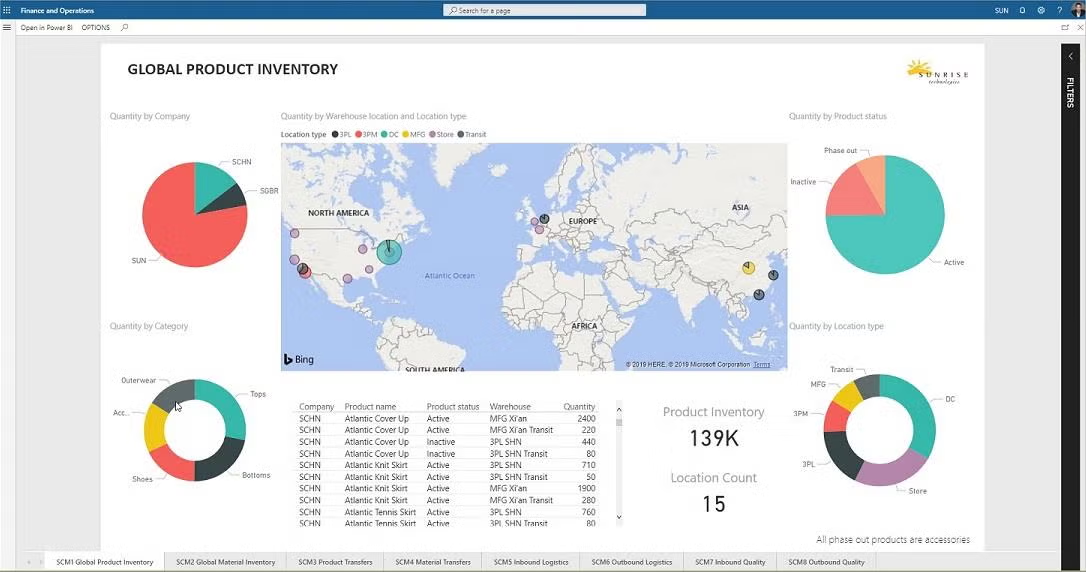
See how Dynamics 365 handles multidimensional inventory

Are you ready to simplify your product data structure? Want to learn more about how Dynamics 365 can efficiently manage your supply chain and revitalize your company? Get in touch with us today!


Evolve your ERP: Moving from on-premise to the cloud

Evolve Your ERP: Moving from On-Premise to the Cloud

If you’re wondering whether your company’s ERP solution has fallen behind the competitive curve, here’s your answer: More than likely, yes.

Current market research shows that over half of companies’ primary ERPs are at least 5 years old, a precariously long time for fast moving markets. As a result, more than 60% of businesses with at least one ERP solution still mostly rely on legacy on-premises systems.

The reality is that on-premises models are facing an increasingly uncertain future, and forward-thinking companies are behaving accordingly. Faced with an aging on-premise infrastructure, most companies with legacy ERP systems are turning to the cloud as the only viable option. Cloud ERPs have become the new normal.

ERPs are the lifeblood of most major businesses. Good platforms track everything from inventory to monthly close, which is why replacing or upgrading them should be approached with the appropriate amount of respect. When the stakes are high, being proactive is the smart approach.

Start Your Journey with Sunrise Today!

Whether you’re exploring your options for new business platforms, or ready to get started, we are trusted business partners for some of the world’s most well-known brands. With over 25 years of experience with the Microsoft stack, we can help you understand all the capabilities Microsoft has to offer.

Sunrise 365 certified for fashion: TEC report highlights

Fashion Extension Certified for Microsoft Dynamics 365

TEC Certification Report Highlights:
How Sunrise 365® compares to ERP fashion and retail solutions

Providing Enhanced Retail and Supply Chain Solutions for D365

We already knew Dynamics 365 and Sunrise 365® is a killer combo for brands and retailers. But we wanted a second opinion. Technology Evaluation Centers (TEC), a leading independent ERP software analyst firm, evaluated our Sunrise 365® Supply Chain and Retail Replenishment solutions and compared against their comprehensive model of ERP for Fashion and Retail. The verdict?

Sunrise 365 for Supply Chain and Retail Replenishment provides essential industry extensions for fashion and consumer goods brands. Here are the key highlights of TEC’s report if you are considering Sunrise 365 for Dynamics 365 and your business is in fashion, apparel, or footwear.

How Sunrise 365® works with Dynamics 365

Sunrise Technologies is the developer of application extensions for Microsoft Dynamics 365 for Finance and Operations (D365) that have been built to manage the unique needs of manufacturers, distributors, and retailers of apparel, footwear, textiles, home furnishings, and similar consumer products.

The Sunrise 365® Supply Chain and Sunrise 365® Retail Replenishment products bring enhanced capabilities to D365 that are especially important to these industries. These capabilities include fully integrating the product variations, multichannel management, and automated processing and control of complex allocation schemes across the entire Enterprise Resource Planning (ERP) application suite.

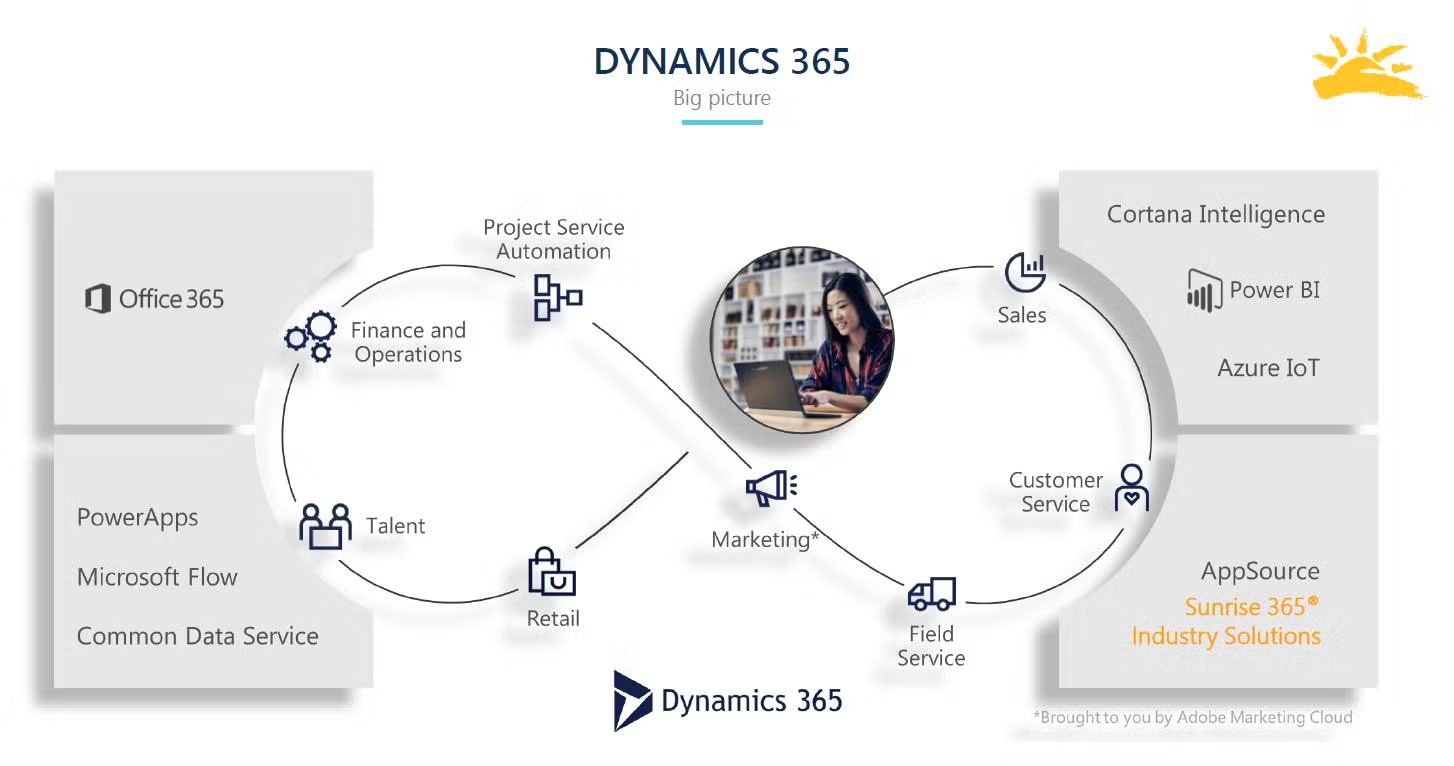
The Sunrise solutions extend the core Dynamics 365 application. Sunrise’s applications are seamlessly integrated into D365, so that users don’t have to know whether they are working in D365 or in the Sunrise applications.

Product extensions

Sunrise 365® adds scale management, global trade item number (GTIN) reuse automation, season management, stock-keeping unit (SKU) lifecycle, and the product lifecycle management (PLM) integration framework to D365.

  • Scale management: supports dual sizing and NRF color and size codes, making it easier to manage products across multiple markets
  • GTIN: automation and reusability tools save time and money
  • Season management: tools to manage styles, colors, and delivery restrictions for seasons
  • Hard attributes: additional attributes like brand, category, and class allow for more specific sorting, filtering, and reporting
  • SKU lifecycle: item statuses allow for greater inventory control and specificity across the entire system
  • PLM integration framework: Sunrise’s framework greatly reduces the time and cost of integrating D365 with a PLM system

Sales extensions

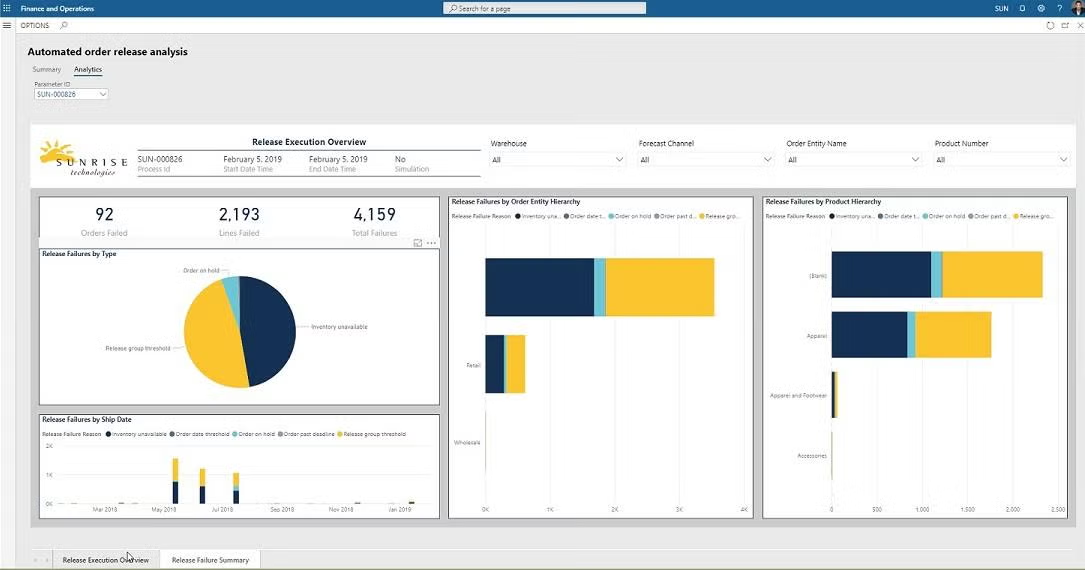
The Sunrise 365® Supply Chain extensions in sales include mark-for addresses, sales restrictions, sales cancellation log, sales order categories, sales order enhancements, bulk order management, and an automated order release. These extensions come with interactive, analytical dashboards that give users more insight into how products are flowing through the system.

  • Ship-to and mark-for addresses: allow orders to be earmarked for specific store
  • Sales restrictions: thresholds that restrict when an order can be released for shipment.
  • Sales cancellations: allow users to know more about why an order was cancelled.
  • Bulk order management: tracks orders and compares against a blanket or master order for all products over the course of a year or season.

Supply chain: where it all comes together

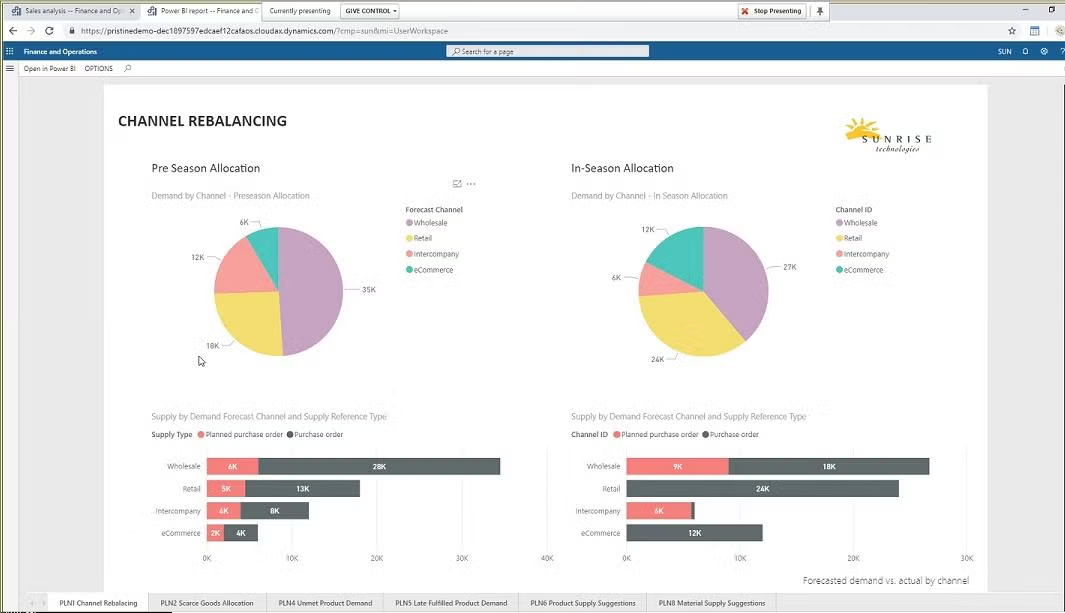
The supply chain extensions are where everything comes together. The tools in this area include support for forecasting, forecast netting, soft allocation, and supply chain analysis. Forecasts can be built that clearly define demand channels (e.g., web, wholesale, or retail). A planning workbench is not only a part of this extension but also a forecast integration framework for those who wish to work with other tools. Supply chain analysis adds other insights to business challenges such as channel rebalancing, scarce goods allocation, projected excess product inventory, unmet product demand, product supply suggestions, and product inventory projections.

One of the most impactful capabilities in Sunrise 365® Supply Chain is the ability to manage what Sunrise calls “soft allocation” on inventory. Soft allocations let a user determine how to flexibly balance demand sequences to supply sequences and ensure that the demand will be appropriately supplied.

This is different from the “hard” allocation process, which occurs natively within Dynamics 365 and is not as flexible at meeting the more fluid requirements of Sunrise’s customers.

Sunrise 365® Retail Replenishment

Retailers need to stock the right products in the right stores at the right time. Sunrise 365® Retail Replenishment is a relatively new product created by Sunrise to meet the demand of its customers, who were coming to them and asking whether they could help them manage retail replenishment without the steep prices associated with a third-party solution. Most of the solutions on the market are very expensive on their own. On top of the software costs, the costs to integrate these solutions with D365 are very steep.

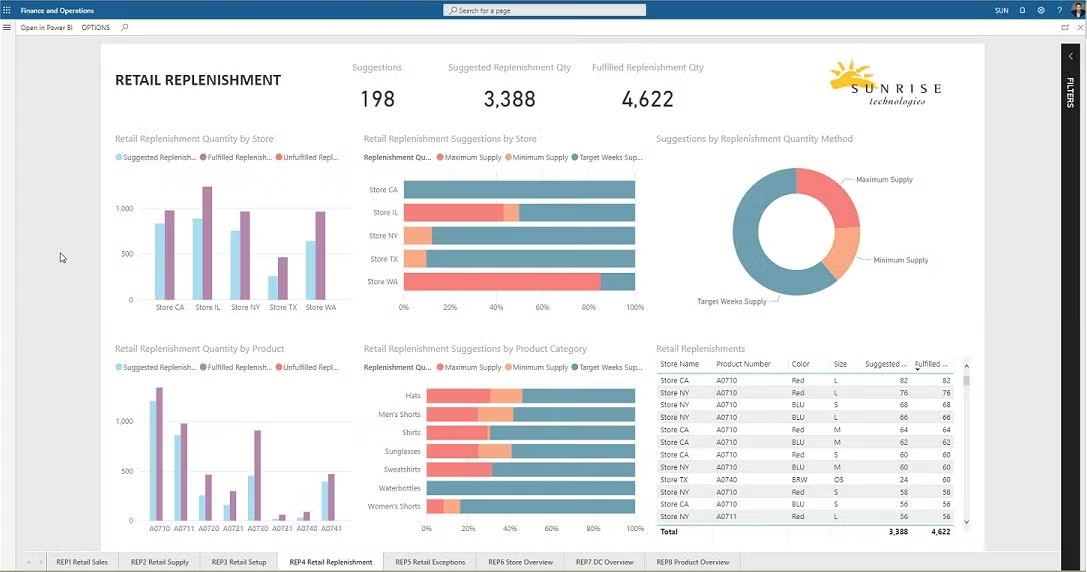
The Sunrise retail replenishment tool brings together the retail store replenishment settings and rules and the actual inventory levels from the POS locations, and then it produces the appropriate retail plans.

In conclusion...

Sunrise 365® brings great value, lowers the overall cost of ERP purchase and implementation, and brings faster deployment to its customers because of its tools and experience in these industries. Marquee customers such as Fila, Bioworld, and others rely on Sunrise to run their business. Anyone looking to purchase or upgrade their ERP system for these fluid consumer industries owes it to themselves to see what Sunrise can deliver for them.

Access the Fashion & Apparel Certification Report

Ready to take a deep dive into Sunrise 365? TEC’s full report shows you how Sunrise 365 stacks up against their comprehensive model for apparel and fashion ERP. If you want all the nitty-gritty details, check out the full report from TEC!

Sunrise 365 for Dynamics 365 is TEC certified for fashion, apparel and footwear

Sunrise 365 for Dynamics 365 is TEC Certified for Fashion, Apparel and Footwear

Sunrise is pleased to announce that Sunrise 365® for Supply Chain and Retail Replenishment has been evaluated and certified for Fashion and Retail by TEC. Technology Evaluation Centers (TEC) is a leading software industry analyst firm.

To achieve TEC certification, software solution providers must conduct a demo of its product and submit a detailed functionality questionnaire. TEC analysts compare the solution against known benchmarks and provide a detailed review of the software’s features.

To learn how Sunrise 365’s extensions make Dynamics and Sunrise a perfect fit for brands and retailers, download the report today!

Start Your Journey with Sunrise Today!

Whether you’re exploring your options for new business platforms, or ready to get started, we are trusted business partners for some of the world’s most well-known brands. With over 25 years of experience with the Microsoft stack, we can help you understand all the capabilities Microsoft has to offer.

PLM integration

PLM Vs ERP

The difference and benefits of integrating PLM and ERP

As a Senior Technical Architect and Project Manager with Sunrise, Mason Whitaker works closely with consumer brands and retailers organizations to ensure smooth Dynamics 365 implementations. Mason has experience working with global organizations in several industries, from e-commerce based mountain bike retail to high-end textiles and fashion.

The Need for Both Systems

Consumer brands and discrete manufacturers often need both PLM (Product Lifecycle Management) and ERP (Enterprise Resource Planning) software.

Since these consumer goods companies are designing and sourcing or manufacturing products, they require both solutions to handle their business operations.

And when shopping for a new ERP system, some companies hope to find them combined together in a single, all-in-one solution…but should you?

Here’s what we are going to dive into:

PLM vs ERP

Let’s start with a few definitions.

PLM: Flexible software that is used to manage the design process, configure and track design milestones, and facilitate team collaboration to plan and design new products to introduce to market.

ERP: Fully integrated financial and supply chain systems which handle high volumes of transactional, structured data, supporting the day-to-day business processes of sourcing and selling those products once introduced to market.

In the real world, the systems must pass product information back and forth…which can be done as an integration between two standalone systems or by adding PLM functionality to an ERP.


And while it is attractive to combine the two systems into a single solution, with a joint backend database, our recommendation may surprise you.


Should PLM and ERP be combined?

By trying to combine the two worlds into one product, companies often see a loss of features in either the PLM or the ERP. Attempts to combine the flexibility of PLM with the structure of ERP often fail — sacrificing unique characteristics of each that made them work in the hopes of finding a single solution.

Therefore, we recommend keeping PLM and ERP separate as a best practice.. In terms of application architecture, these two software solutions are complete opposites.

By allowing the two systems to operate separately from each other, both can function at their best to deliver the results you wanted from your investment in the first place. Product data for design, and product data for manufacture and sales transaction are very different.


The real need is for appropriate integration points so the two separate applications can pass product information back and forth, like attributes, variants, etc.


Where do you draw the boundaries between ERP and PLM?

Here are four general rules of thumb as you consider your product offerings across all channels and global regions.

  1. Not all products need to live in the PLM. Only the ones that your consumer goods company designs in house need to start their product lifecycle in the PLM. The products that are designed by third parties can skip the PLM cycle and be entered straight into the ERP.
     
  2. You must determine which system will provide the master for each product, and it should always be the master system going forward. This will help you avoid conflicts and duplications — which is critically important to avoid dual-sided, complex integrations.
     
  3. Planning an interface between ERP and PLM needs to take into account more than just the product data. For example, you need to first plan the foundation for how product data will flow across the applications without friction, including reference data for units of measure, seasons, currencies, and vendors.
     
  4. And finally, in addition to reference data and product data, more complex data integrations need to consider the flow of data for BOMs, POs, routes, etc.


If this sounds like a lot to consider when planning your PLM and ERP integration, or if you’re considering Microsoft Dynamics 365 for your ERP, then good news! We’ve already created a framework for you.


Frequently asked PLM and ERP questions

Create it in your PLM and push that product data to your ERP.

If you are going to drop a color, extend a color across seasons, or introduce a new color, you should make those changes in your PLM first and then push the data to your ERP.

No, these rules of thumb don’t necessarily require that all product data like assortments, hierarchies, attributes, etc., need to be maintained in one system.  

No, as a similar case to above. An intelligent integration design will keep a single system as the master application, while letting other third-party systems append additional data elements, such as attributes, as needed. 

PLM Integration Framework for Microsoft Dynamics 365

Because thinking through intelligent PLM integration frameworks is complicated…and because we’ve done it a lot, we include this as part of our industry solution, so you don’t have to start from scratch.

In fact, most of our customers require a best-of-breed PLM system to manage the design of new products, and that’s why we include a PLM integration framework as part of our Sunrise 365® Supply Chain extension for Microsoft Dynamics 365. It has everything you might need to configure, manage, and process the integration with your preferred PLM software – and has been built to be customized and extended to meet the needs of any implementation.

It utilizes a set of message entities to send and receive data to and from any third-party PLM system of your choice. The integration framework includes a set of out of the box entities for reference and product master data, and the solution can also be extended by creating additional entities or extending existing entities for your unique requirements (for example, add message entities for Bills of Materials).

In case you weren’t familiar, our supply chain solution extends Microsoft Dynamics 365 for Finance and Operations with a ton of advanced functionality that any consumer brand, apparel, footwear, or fashion company would need to make it a perfect fit. The PLM Integration framework is just one tiny piece of it, but you should also note, it also includes integration frameworks for your 3PLs and eCommerce platform too!

Start Your Journey with Sunrise Today!

 Whether you’re exploring your options for new business platforms, or ready to get started, we are trusted business partners for some of the world’s most well-known brands. With over 25 years of experience with the Microsoft stack, we can help you understand all the capabilities Microsoft has to offer.

TEC certification report

Review: Sunrise 365 Supply Chain and Retail Replenishment for Fashion and Retail Brands

Technology Evaluation Centers (TEC) is a leading software industry analyst firm. To achieve TEC certification, software solution providers must conduct a demo and submit a detailed functionality questionnaire. TEC analysts compare the solution against known benchmarks and provide a detailed review of the software’s features. The extensions in Sunrise 365 add support for essential fashion and apparel industry functionality, all seamlessly integrated into Dynamics 365.

Sunrise Customer Stories

Vera Bradley: Dynamics 365 at the Heart of Its Digital Transformation

Read More >>

Murdoch’s Ranch & Home Supply: Retail, Supply Chain, and Finance on Dynamics 365

Read More >>

5.11 Tactical: Tackles Global Challenges with Dynamics 365

Read More >>

Get Your Money's Worth

Save time and gain instant value when you deploy Microsoft Dynamics 365 with Sunrise industry extensions.

7 factors for success: Everything you need for a successful ERP implementation

7 Critical Factors for a Successful ERP Implementation

Your guide for accelerating your cloud ERP deployment

People often ask us what they can do to ensure a successful ERP implementation. The thing is, ERP implementation strategies and best practices have evolved since the introduction of cloud ERP. To achieve a successful go-live, it’s important to refine and evolve your methodology as industries change. In this blog, we’re sharing some of our secrets for how to pull off a successful ERP implementation.

Over the last 30 years (and 300+ implementations), we’ve encountered every roadblock you can think of. So, we started to wonder: how can we counter those roadblocks? Is there a way to keep everyone on track and accountable while providing quantifiable metrics for a project’s progress? The answer is yes! We built a tool—Sunrise Quick Start 365®—to help smooth the path and ensure implementation success.

You already know that successful ERP implementations don’t just happen. It takes hard work from a lot of dedicated people to get a new system up and running. You might have noticed that we haven’t mentioned software yet. That’s because we understand ERP projects aren’t just about implementing software, they’re about people, and how those people embrace or reject a company’s new ERP system can be the difference between success and failure.

There are several ways to approach the implementation of a new ERP system like Microsoft Dynamics 365, and some approaches work better than others. At Sunrise Technologies, we’ve implemented hundreds of ERP solutions powered by Microsoft for our customers in the apparel, footwear, home furnishings, retail, and manufacturing industries. Along the way, we discovered certain methods and best practices for implementing ERP in these industries. If you’re looking for a guide to making your ERP implementation as painless as possible, you’ve come to the right place.

Based on 30 years of experience, we’ve identified seven critical success factors that influence the outcome of a project:

Executive support

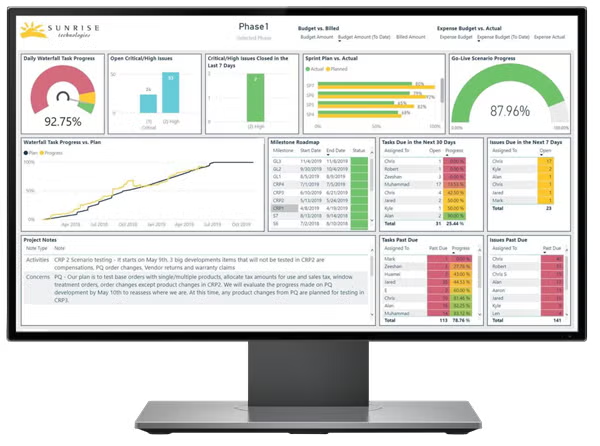
It’s vital that your executive team is on board with your ERP project. We know from experience that projects succeed when everyone is working from a single set of facts, which is why Quick Start data resides in a single database, giving both Sunrise and customers an identical view of a project’s status. Power BI dashboards with almost real-time updates give everyone a bird’s-eye view of the implementation and keep people on the same page. Embedding Power BI into Quick Start has been the biggest game-changer since we launched the tool in 2013. Users have a quantitative view of how a project is progressing, and project managers can spot bottlenecks quickly.


Employee involvement

Your ERP implementation team should be composed of the best employees from across your organization. These are your rock stars, the people who know your current processes inside and out. These internal resources should exhibit the ability to understand the overall needs of the company and be entrusted with critical decision-making responsibility and authority.

Quick Start comes with a library of top-notch workflow processes for your industry which helps take care of the repetitive work so consultants can get down to business. Our methodology combines agile and waterfall methodologies, and sprint-based work so our consultants shadow, interview, design, and leave behind a beautiful set of processes and documents.

Clearly defined project scope

Having a well-defined and written scope of work can mean the difference between a failed project with disastrous results and a highly successful project with huge benefits. Your project scope is the basis for the requirements of the project and the resources that need to be deployed. Don’t skimp on scoping. It pays to spend the time upfront making sure EVERYTHING is documented; plus defining clear expectations and establishing overall goals.

Quick Start is more than a task manager. Our dashboards provide a fact-based, quantitative view of your project’s status. Track progress, see how far you’ve come, compare against budget, and see what’s left to do. Implementations, at their heart, are just thousands of tasks (okay, maybe tens of thousands of tasks. To some of you, it probably feels like hundreds of thousands of tasks.) The idea is simple: have a single location where ALL the project tasks are tracked and make it visible to both the client and project teams.


Plan to optimize business processes

One of the most expensive aspects of an implementation is customization. We’ve heard horror stories of thousands of hours sunken into customizing an ERP system that, in the end, still didn’t work for the customer.

Quick Start saves valuable implementation time by providing standardized processes for the repetitive stuff we encounter in every implementation, and a set of best practices:

  • Datasets pre-configured for apparel, footwear, CPG, and retail companies
  • Abstract process flow guides aligned with best industry practices
  • Visibility into timeline and budgets
  • Tools to facilitate easier instance copying for testing, validation, and migration

We also gave the tool a makeover – now with a modern and simple UI, Quick Start stores everything in the cloud, so users can view a project’s status anywhere, anytime.


Proactive change management

ERP implementations change the way people do their jobs, and no one likes change. It’s important to build in enough time to train people on new systems and processes. After all, you bought a new ERP system to make work easier! Don’t let end users feel like they just swapped an old, clunky headache for a newer, shinier headache.

To make end user training successful, training should start early, preferably before the implementation begins, especially for skills that will help users better implement and utilize the solution. Executives often underestimate the level of education and training necessary to implement an ERP system as well as the associated costs. Top management must be fully committed to incorporating the training cost as part of the ERP budget.

For a successful implementation, you need structured project management, full transparency, and buy-in from users at every level of the organization. We created Sunrise 365® Quick Start to streamline Dynamics 365 projects, by combining methodology, best practices, and quantifiable progress metrics into a single solution. You can get to go-live faster and experience your company’s digital transformation sooner.


Project management tools

Why would we build a specific tool for ERP project management, when we could pull one off the shelf? Because ERP implementations fail for so many reasons: miscommunications, mismatched expectations, an inability to spot problems before they snowball…the list goes on and on. We set out to create a system that minimizes risk and gives everyone a task-oriented, fact-based view of the implementation in real time. Quick Start is tailored to Sunrise’s sprint-driven methodology. We cover this in much more detail in our methodology blog post, but the bottom line is that it works. By leveraging the knowledge we’ve gained from 30 years of experience and over 300 go-lives, Quick Start provides a structured path to success.

A partner that knows your industry

ERP deployments, especially for consumer brand companies, have many moving parts that impact every aspect of an organization. To help monitor and guide your project’s success, we recommend working with a partner who knows your industry as well as they know the software.

Since the original release, we’ve reconfigured the solution to optimize it for Dynamics 365 implementations. Every feature of Quick Start has been included because we encountered it in real ERP projects.  We built this tool from the ground up, and we continue to refine and update Quick Start as our industries change, Microsoft’s software roadmap changes, and new customers go live.

Quick Start: our secret sauce for successful implementations

In 2013 we debuted Quick Start, our Dynamics 365 implementation and project management tool. Since then, Quick Start has become indispensable to our customers and consultants alike. What began as a set of best practices, tips, mappings, datasets, and checklists has evolved into a full-blown, cloud-based project management application, specifically designed for Dynamics 365 implementations. Our customers love Quick Start so much, we wanted to share an updated overview of how Quick Start helps clients save time and money during implementations.

Quick Start saves time and money by packaging our Sunrise implementation methodology with a project management application and embedded Power BI dashboards to track progress. Originally developed for Microsoft Dynamics AX 2012 R3, today Quick Start is built specifically for Dynamics 365 and runs on Microsoft Azure. Power Platform tools like Flow pull data from a single database and Power BI dashboards show project status at a glance.

How to have it all: a blueprint for a successful ERP deployment

There is a solution – we’ve designed Quick Start to ensure your Dynamics 365 implementation is a success. Quick Start is the ultimate blueprint for following the best practices in this blog. And Quick Start is included FREE with every implementation when you partner with Sunrise Technologies.

Ready to See More?

Schedule a personal demo and we’ll show you the ins and outs…the secret sauce…that helps us take clients live on Dynamics 365. You’ll see how Power BI helps monitor project progress, and get the inside scoop on our successful project methodology.

ERP implementation cost calculator

5 Hidden Costs of Doing Nothing

Putting off your on-premise ERP replacement may be costing more than you think

As the SVP of Global Business Development for Sunrise Technologies, Cem Item serves as a trusted advisor to C-level executives running large global enterprises. He conducts corporate business strategy engagements and digital transformation workshops around the world. With over 20 years of consulting experience, Cem specializes in the textile, apparel, footwear, home furnishings, consumer goods manufacturing, and retail industries.

A lot has changed in the few years since cloud computing has become the norm. Very often, we talk to people who are thinking about moving to the cloud, or a new ERP project, but they just can’t wrap their heads around the cost and potential for business disruption. And that’s understandable – an ERP project is a huge undertaking.

But what we wish more people would consider is that the costs of maintaining legacy systems or using outdated business processes is often much higher than an ERP implementation. It’s just tougher to spot these costs. They’re usually so embedded in a company’s way of doing things, that they show up as lost time, lost productivity, and frustrating processes due to outdated technology.

You know your business – but have you quantified all the ways doing nothing is costing your business?

Why Do Organizations Delay Digital Transformation?

Some decision-makers delay digital transformation or spend too much time weighing the pros and cons of cloud computing, thinking their current systems can last for a few more years. But what people may not realize is that the cost of doing nothing – and staying on legacy or on-premise systems – is much riskier in our new world of cloud-based business applications. You could be exposing your business to losses in revenue, security flaws, and system failures.

It may seem like doing nothing is the safest option, but that way of thinking is counterproductive in this new reality of cloud-based infrastructure. Moving to the cloud (and using a cloud-based ERP system) means a company can quickly modify their business models or processes to adapt to changing conditions in their industry. More and more businesses are pursuing growth through acquisition, and folding in newly acquired companies to ancient accounting and supply chain systems can end up costing millions of dollars.

We’re living through a cloud computing renaissance, and companies that don’t adapt are failing. For retail, apparel and fashion companies, the landscape is littered with organizations that have gone out of business, been acquired, or are shadows of their former selves.

All too often, these businesses failed because they couldn’t adapt their business models to serve their customers. And their IT and supply chain systems play a huge role in those failures. Outdated, on-premise, expensive systems that take years of time and millions of dollars to reconfigure to match the new reality – and then the reality changes again. Instead, you could be using a system that is always modern and updated, and ready for whatever twists and turns your industry takes.

Have you thought about the following issues, and considered whether your aging systems are partly to blame?

Losing customers | Losing time | Losing staff | Losing visibility | Losing security

Let’s dig into those 5 areas of your business where the costs of doing nothing might be much higher than you think.

1. Losing customers

If you’re a consumer brand, and you make it hard for consumers to buy your products, they will drop you like a hot potato.

According to Microsoft’s Global State of the Customer report, 66% of US consumers polled ranked customer service as “very important” in their choice of a brand and brand loyalty. But since we know legacy systems don’t easily communicate with CRM and other customer service applications, companies using outdated systems often run into problems.

Everything – from your e-commerce platform to your POS system to your customer service center, right down to your fulfillment center – should create a seamless experience for your customers to buy, exchange, and return products. Look at these warning signs of degrading customer service:

• Complaints about promotional pricing issues

• Complaints about the shopping experience, whether it’s in the store, online, or over the phone

• Delivery issues and shipping delays

• Increase in returns and chargebacks

• Increase in shipping costs

• Purchase histories are spread out across multiple databases

• Your customer service reps’ response time is slowing down; they use multiple systems to answer customer questions.


• Your systems are holding you back from testing new channels like pop-up stores, tradeshows, or wholesale orders online – it’s a huge project just figuring out how you’re going to make those orders work in your system

If you think of every bullet point as an opportunity for lost sales…well, that’s a lot of lost sales.

2. Losing Time

Cliché but true: time is the most valuable resource. And if you are constantly dealing with workarounds and fixes for your outdated ERP system, that’s time you could have spent on revenue-generating projects. On an intellectual level, you know this. In day-to-day operations, though, it’s difficult to quantify lost time. But if your organization is guilty of the following, you’ve got problems:

• Your team members spend more than half the month trying to close out the previous month

• People must ask for reports days or weeks in advance (because it takes days or weeks to create reports)

• People worry about the accuracy of the data they receive, so they hesitate to make decisions

• People are frustrated with the current system, and they come up with their own lengthy workarounds and processes just to avoid using it

• IT is tasked with finding solutions, but not enough budget, and end up buying the equivalent of a box of Band-Aids

Forrester’s Total Economic Impact study for Microsoft Dynamics 365 found that companies who implemented D365 improved operations efficiency by $39 million. When you add in automation, better user experience, reduced rework, and enhanced forecasting, employee productivity increased by $20.6 million.

Look, you can tell yourself it’s fine, or it’s not that bad. But you’re falling behind your competitors. The hours you spend maintaining legacy systems and hardware are hours you could have spent growing the business. Ask your team what projects they would pursue if they didn’t have to maintain whatever dinosaur of a system is back there. How much money are you losing because your employees aren’t innovating, they’re stagnating? Which brings us to….

3. Losing Staff

One of our customers had an interesting problem – their legacy ERP system was still chugging along, but it was getting harder to find IT staff to manage it!

Their system had been around since the early 90s, and several employees were getting ready to retire. All the young, smart IT professionals that this company wanted to hire either had no experience with this green-screen behemoth, or they weren’t interested in working for an organization where their skills would go towards maintaining a dying system.


If your best employees are being lured away to work on new and exciting technology projects, or at the very least, work someplace with technology that isn’t older than they are, it’s way past time for you to think about your long-term strategy. No one wants to jump on a sinking ship.

Not to mention, it’s getting harder for technology vendors to survive. Smaller software vendors are getting gobbled up and on-premise systems are being sunset.

4. Losing Visibility

You can’t trim costs, correct issues, or grow revenue, without control and visibility. But the biggest problem with legacy infrastructure is an inability to control the weakest links of the supply chain. Ask yourself:

• Are inventory and supply chain movements disconnected from the financials, making it impossible to get a real-time view of the business?

• Is one channel hoarding inventory from another channel, leaving excess inventory in one area and shortages in another?

• Do you have trouble completing orders on time and are you unable to provide available-to-promise estimates?


• Are your POS, CRM, and ERP systems already in the cloud, but different clouds with separate vendors and billing cycles that is costing you way more than if they were   consolidated on a single platform?

• Do you lack real-time information to make the best decisions quickly because data is locked in silos?

5. Losing Peace of Mind (Because of Security Risks)

Security risks are frightening. And while it’s true that any business can fall victim to a cyberattack, some setups are more vulnerable than others. Think about what would happen to your brand’s reputation if your company was hacked. Can you quantify (or do you even want to think about) the total dollar amount of lost sales from a security incident? Think of each of these points as a crack in your IT’s foundation, exposing you to cybersecurity risks:

• How much time, effort, and money does it take to maintain your current infrastructure, custom code, and integrations?

• Have you cobbled together a bunch of third-party products to make your processes flow the way you want and have trouble reporting and keeping the system up to date?

• How much capital and resources are sunk into maintaining hardware?

The Hidden Costs of Maintaining the Status Quo

Some people think the cost of doing nothing is…free.

Frankly, those people are wrong.

The money you think you’re saving by putting off an ERP or digital transformation project could be slipping away. If your supply chain and underlying technology infrastructure can’t adapt to meet your company’s growth initiatives or customer demand, then your company’s survival in this new, cloud- centric world is at risk. We won’t dive deep into all the advantages of the cloud here. There’s simply too many for this blog post, and that’s why we wrote this cloud eBook.

Ready to See More?

The new landscape of business applications is exciting. It’s possible to get the cloud ERP system of your dreams at a tremendous value, with the industry-specific extensions you need, and without expensive customizations.


If you’ve realized it’s too costly to wait any longer on updating your systems, let’s schedule a digital transformation workshop.

How Frette modernized a heritage brand on Dynamics 365

How Frette Modernized a Heritage Brand on Dynamics 365

Microsoft spotlights Sunrise customer Frette and their Dynamics 365 deployment

This post first appeared on Microsoft’s Dynamics 365 blog. Read the original post here. Image: Frette.

One might think that the world’s oldest brands are least resistant to change—as if innovation and heritage are opposing ideas in business. Instead, we can learn a lot about endurance in modern business from brands that have adapted to change for decades or, in the case of luxury linen maker Frette, for more than 155 years.

Since 1860, Frette has crafted luxury linens found in the world’s most prestigious hotels, private homes, royal palaces—even the Titanic and Orient Express. Now the company is taking a big step to bridge it’s past, built on a tradition of quality and customer service, and its future, as an omnichannel business built on Dynamics 365.

Frette initially set out to update its point-of-sale system in its boutiques across the U.S. and Europe. Behind the scenes, however, the company was struggling to present customers with an omnichannel retail experience. The business operated on over a dozen legacy, outdated systems, so there was a need to unite lines of business across European and North American operations.

As Paolo Fabiocchi, CFO of Frette explains, “We started just by looking for a solution for our stores, but once we learned about Dynamics 365, our vision became having true omnichannel capabilities to better serve our customers. That the solution (Dynamics 365) has global, Tier 1 capabilities but is still so much less complex and costly to maintain was what really put it over the top for us.”

Frette met with Sunrise Technologies, an award-winning Dynamics 365 partner, to help modernize the business. Sunrise focused on solving several key challenges, connecting Frette’s business ecosystem, improving visibility across the organization, and automating manual, error-prone processes.

Unifying operations on a modern cloud platform

For many companies, legacy modernization is a daunting initiative, and Frette’s challenge was no exception. The company has multiple divisions to handle hospitality, wholesale, consultancy, and retail businesses—with divisions segmented across Europe, North America, and Asia. With disjointed systems and databases, customer service agents had limited access to inventory and orders, and customers experienced increased order processing times and wait times to check order statuses.

On Dynamics 365, Frette is unifying international systems and business processes. By dismantling data silos, they now have a single platform to run operations—from production to back office to POS. Best of all, Frette can unlock company data for a holistic, 360-degree view of the business, customers, and employees. For example, they can now follow an order from production in Italy to a boutique in New York, with real-time order and inventory status available to frontline workers. Frette also expects to explore IoT, machine learning, and other emerging technologies that will provide pervasive intelligence to reveal insights and trends across the organization.

Automation, everywhere

With company data like orders and inventory scattered across silos, Frette struggled with highly manual processes and a lack of visibility at every level of the organization, from the call center to the C-Suite. Overstocking was common to ensure popular items were on hand. The B2B hospitality business had increased staff by 30 percent in three years to keep up with manual order entries. Ecommerce orders had to be manually duplicated between the POS system and distribution systems. And returning an ecommerce order in store caused hassles on the back end.

Sunrise Technologies focused on streamlining and automating the business, including implementation of its custom supply chain solution that seamlessly integrates with Dynamics 365. Now Frette has a single platform that eliminates time-consuming, error-prone processes while seeing everything from inventory levels, orders, and allocation scenarios in one place.

The takeaway

Frette’s story shows us what’s possible when ingenuity and foresight are baked into a company’s values and culture. By modernizing its entire operation on future-proof business solutions, the company has ensured its 155-year tradition of first-class customer experiences is preserved for generations to come.

Start Your Journey with Sunrise Today!

 Whether you’re exploring your options for new business platforms, or ready to get started, we are trusted business partners for some of the world’s most well-known brands. With over 25 years of experience with the Microsoft stack, we can help you understand all the capabilities Microsoft has to offer.

Apparel roadmap

Apparel Roadmap

Sunrise teamed up with Apparel Magazine for this technology roadmap, focusing on actionable steps for successful supply chain management.

4 Steps for Successful Apparel SCM

  • Determine your ideal business architecture
  • Get to the root cause of problems
  • Select the right technology to support your journey
  • Blend intuition with data-driven insights

A new generation of sophisticated technologies is transforming apparel manufacturers and retailers into a highly connected, intelligent, and more productive industry. Microsoft Dynamics 365 can help you:

  • Create intelligent value changes
  • Enhance digital shop floors, warehouses, distribution centers, and retail centers
  • Spot issues in the supply chain before they materialize

Read more in the full roadmap (6 page PDF) or explore Microsoft Dynamics 365 for apparel and fashion in more detail.

Get Your Money's Worth

Save time and gain instant value when you deploy Microsoft Dynamics 365 with Sunrise industry extensions.