Inventory Allocation

Soft and hard allocation: understanding the difference

Both are essential for efficient supply chain management

As the SVP of Global Business Development for Sunrise Technologies, Cem Item serves as a trusted advisor to C-level executives running large global enterprises. He conducts corporate business strategy engagements and digital transformation workshops around the world. With over 20 years of consulting experience, Cem specializes in the textile, apparel, footwear, home furnishings, consumer goods manufacturing, and retail industries.

If hard allocation is the hammer and nails of supply chain, soft allocation is like magnets and a whiteboard.

Defining soft and hard allocation

Allocation (the point where supply meets demand) is one of the most important pieces of the supply chain. So many critical business processes— customer service, inventory, sales — start hinge on smart allocation. Among supply chain professionals, software vendors, and other stakeholders, different words and terms get thrown around and people get confused. Here’s our point of view on hard and soft allocation, and challenges within each.

Very simply, hard allocation means the commitment between supply and demand cannot be changed. It’s been finalized, agreed upon, and now items are ready to go. Soft allocation, on the other hand, has a little wiggle room. Supply can shift as needed. Both practices play an important role in the supply chain, but typically we expect allocation to start out soft. Over time, as conditions change, allocation should get harder. During the planning process, hard and soft allocation can even be tied together.

Key differences between hard and soft allocation

Soft allocation

  • Supply is flexible, depending on changes to demand. It’s possible to shift quantities and orders as needed.
  • Usually, in the early stages of planning, soft allocation is the name of the game. Delivery is a long way off.
  • Deals with planned and firm entities alike.
  • More planning-oriented.

Hard allocation

  • Supply is committed to the demand, with no changes.
  • Delivery date is very soon…think days or weeks.
  • Only interested in firm entities.
  • More execution-oriented.

Challenges in the planning process

Planning usually starts with a forecast. Over time, orders are placed and users compare them to the forecast and adjust. The type of business can dictate how planning is handled. For example, wholesale businesses that gradually firm up demand over time may have semi-firm demand like a bulk or blanket sales order. For retail or eCommerce businesses, demand is never locked in until a customer places an order. Things get really complex for companies with multiple channels – retail, ecommerce, and wholesale, for example. Every channel requires different demand planning, from forecasting to bulk orders to placing actual orders.

Meanwhile, you also have planned purchase orders or production orders. Over time, these planned orders are scheduled, or goods are produced and delivered, and placed in inventory. All along the way, a company is juggling many types of supply (planned orders, in-progress orders, inventory, etc.) alongside many types of demand (the forecast, sales orders, standing bulk sales orders, etc.) And it’s the supply chain’s job to strike the delicate balance between the two.

How soft allocation helps you manage your supply chain

Let’s say you’ve just begun a new season, or otherwise in the beginning of the planning cycle. At this point, few orders are confirmed. You have a forecast, but products are still on order or in production, or something in between. This is the worst possible time to start hard allocating supply against the demand. You’ll encounter both inventory headaches from all the effort to re-organize and re-plan when orders are canceled or rescheduled, and you’ll have a bunch of customer service problems, too. This is the time when you should go with the flow. This is where soft allocation is your superstar.

If hard allocation is the hammer and nails of supply chain, soft allocation is like magnets and a whiteboard. While orders are being placed, you should be able to shift supply to demand as priorities change. Seeing the big picture — whether that’s by channel, customer, product, vendor, or other entities — is key to understanding and managing your supply chain for the best results.

Hard allocation comes into play when you’re ready to execute. At this point, you’re dealing with the firmest supply and demand (inventory and sales orders). Releasing the orders might be constrained by fulfillment rules, like no partial shipments, or at least fifty percent of line level is satisfied, or similar. Challenges at this stage are implementing these fulfillment rules while maximizing the amount of inventory that ships. The right allocation solution lets you set up and edit these constraints quickly and easily.

Start Your Journey with Sunrise Today!

 Whether you’re exploring your options for new business platforms, or ready to get started, we are trusted business partners for some of the world’s most well-known brands. With over 25 years of experience with the Microsoft stack, we can help you understand all the capabilities Microsoft has to offer.


Continuous updates: stay current and avoid issues

Don't be afraid of continuous updates

Having a strategy (and extra help) for ERP software updates can smooth the path

Scott Hambright is Sunrise’s Director of Global Customer Support. Prior to joining the Global Support Team, Scott was a Senior Technical Architect for Sunrise, assisting clients on ERP implementations in the apparel, retail, consumer goods, and manufacturing industries.

The new ERP update model

The continuous update model has been one of the biggest shifts in modern ERP over the past few years. In the past, companies would spend millions of dollars and go through intensive upgrade projects to migrate to the newer version of whatever ERP they were using.

ERP upgrades used to be expensive and time-consuming, but no more. Instead, companies have replaced one anxiety for another – continuous updates. Dynamics 365, and cloud-based infrastructure, means software updates can be pushed automatically. But this makes people nervous. Since an ERP system handles so many functions within a business, users are wary to just accept the latest updates. But they’re essential for keeping your business humming along. So, you need a strategy for handling continuous updates in a way that maximizes their value and minimizes impact on your business.

Prioritize the most essential business functions

When it comes to updates to your ERP system, focus on maintaining business continuity. Before you start testing, define the most important processes — the ones that you have to get right to keep the lights on. Being able to get orders out the door is far more important than posting a fixed asset depreciation journal. Get your team together and make a list. Plus, it’s easier to define success when you have criteria to refer to.

Focus on testing customizations and extensions

There are generic ERP software functions, and then there are your functions — the customizations and extensions that make your business unique. Get your software vendor to handle testing the basics, like creating sales orders, receiving a purchase order, etc. And if your software vendor can’t or won’t do this for you, find a vendor who will. This testing phase is your opportunity to make up scenarios to ensure your customizations are good to go.

How to handle integration testing

Integrations are the most fragile part of your system, so spend the most time making sure those connections are solid. Luckily, you only have one aspect to test – your connection, not the external system. Here’s one way to do it:

  • For inbound messages: have a set of sample data prepped before you start

  • In your test environment: push the sample data through the system (with the new updates) and see what happens.

  • For outbound messages: export your data in XML format and use file comparison tools to see if anything changed from the new updates.

Use automation to keep up with updates

Most cloud solutions will come with tools to help you test updates. This is where automation comes in handy. You can save significant amounts of time by setting up automated functional and integration testing. There are a lot of options – you can build functional scripts to run through your customizations. You can take data snapshots for use in inbound and outbound integration testing. Obviously, you’ll need a separate software environment to test everything, and a human to oversee this testing process.

We recommend that you aim to make testing your software updates as fast and automated as possible (so if there is a problem, you can devote time to fixing problems, not boring rote work).

Checklist for testing ERP updates

  • Define the most important business processes and prioritize testing those first.
  • Create test scenarios for your system’s customizations and extensions. Leave the standard functionality testing to your vendor
  • Spend the most time on testing integrations – these are the areas that are most unique to your system footprint.
  • Consider automated testing for functional and integration updates.

See how Dynamics 365 handles inventory management

Are you interested in learning more inventory best practices? Would you like to a see a modern, streamlined allocation solution that gives you both flexibility and accuracy? Contact Sunrise today!

Season codes: what are you really tracking?

Remove season codes from style numbers for better inventory management

Ask yourself: what are you really tracking with a season code?

As the SVP of Global Business Development for Sunrise Technologies, Cem Item serves as a trusted advisor to C-level executives running large global enterprises. He conducts corporate business strategy engagements and digital transformation workshops around the world. With over 20 years of consulting experience, Cem specializes in the textile, apparel, footwear, home furnishings, consumer goods manufacturing, and retail industries.

The importance of seasonal products for brands

Some brands live or die by seasons. We work with a lot of apparel and fashion brands, and seasonal inventory is very common for these companies. Winter coats, summer dresses, that sort of thing. While other types of businesses certainly have a seasonal element, there is tremendous pressure for brands to stay on top of the latest trends (or create trends themselves).

Optimize inventory with season codes

Season codes give you the ability to report on a product’s sales performance by season. This is a good thing. Especially for apparel and fashion brands, the styles of products change from year to year. A style may have one season to prove itself, and if it doesn’t sell well, it’s gone next year. Often, we find companies add the season code to a product’s style number — for example, say you make a dress and call it DressF20.

Embedded season codes in style numbers cause problems

At first glance, combining season codes and style numbers seems fine. It makes logical sense. But over time, keeping these two attributes together causes problems. Let’s examine a few:

Problem 1: If you decide to sell across seasons, you need to create new style numbers for the same product

The dress from Fall 2020 was a big hit. You want to carry it next year. Great! However, you’ll now have to make a DressF21 style and move the 2020 inventory to the new 2021 style number.

Problem 2: Carried-over styles need new color and size product variants

The original dress you sold that was so popular — you also have to make new color and size variants for the carried-over style.

Problem 3: You must complete inventory transfers for the new SKUs.

You’ve got your new style number, your new variants — now it’s time to transfer the leftover inventory from the old SKU to the new SKU. Now imagine doing all this work for 10, 20, 30 styles every season. Think about all the time and effort wasted — all because you’re tracking styles and the season code together.

Last season doesn’t really mean last season (for styles)

Ask yourself: what data are you really trying to capture with the season code? Are you trying to document:

When the product was designed?

When the product was manufactured?

The selling season for the product?

A better way to manage seasonal inventory

You may find a more logical attribute than season, or that there are actually multiple “seasons” that have nothing to do with whether it’s snowing outside or not. Maybe design seasons are the way to go. Another way to think about it is in terms of color. Colors lend themselves to seasonality more than style, so you could link a season code with a color rather than a product. The best way to generate season codes will differ for your business, but being thoughtful about what you really need that data for, and setting it up right the first time, can save time and money down the road (no more frantically keying in new product numbers and inventory transfers).

Start Your Journey with Sunrise Today!

 Whether you’re exploring your options for new business platforms, or ready to get started, we are trusted business partners for some of the world’s most well-known brands. With over 25 years of experience with the Microsoft stack, we can help you understand all the capabilities Microsoft has to offer.

What should your product numbers mean?

What should
your product numbers mean?

Should you use intelligent numbers in your product data setup?

As a Senior Supply Chain Consultant for Sunrise Technologies, Melissa Welhelmi brings over 20 years of industry experience to the table and serves as a trusted advisor for apparel, footwear, and consumer goods companies that are in the midst of an ERP replacement. 

Intelligent product numbers

Like we’ve discussed before, product is the heart of your brand. And since product structure is such an integral part of your business, how you number (or don’t number) those products matter. A lot.

Intelligent numbering is very common in the industries we work with. This is when a product’s number or ID contains meaningful information. For example, a fashion brand might have a jacket label WJF20S123-BLK-S. In the style name, “W” means Women, “J” means Jacket, F20 means Fall 2020 season, S123 means the sequential style number. “BLK” is the color black and “S” stands for small size. The style numbers can get really detailed.

At first, intelligent numbering makes a lot of sense, especially for quick analysis. At a glance, users can see the most important attributes. Especially with companies using legacy inventory management systems, users may rely on those product numbers packed with meaning for reporting and analytics.

Why smart numbering is no longer a best practice

Businesses change. Employees leave and take their institutional knowledge with them. New staff members have to learn and maintain the product numbering schema. Because humans maintain these numbers, mistakes happen. Eventually, you may find that no one understands what your company’s product numbers mean anymore, but you have to maintain it for the sake of not having a better alternative.

In many ways, intelligent numbering is an outdated practice that should be left behind with legacy systems. There are many downsides: 

  • Someone needs to be well-trained and well-versed in the product numbering schema so they can correctly configure products. Mistakes cost time and money to fix.
  • Heavy reliance on insider knowledge — new staff members don’t know the meaning behind the intelligent numbers.
  • Hard to maintain — adding new product categories means you might have to rethink the whole data structure and add new, complicated logic.
  • Adding new products can be time-consuming, with a higher likelihood of manual entry and errors.

Intelligent numbering isn’t just a human problem, it’s a systems problem. Especially for consumer brands, once they start adding new product categories, additional information must be added to the product master data setup. The extra business logic that comes with this work adds another layer of complexity to something as simple as numbering products.

Trade smart numbers for a smarter system

We’ve discussed this in detail in some of our other blogs — there’s a better way!

Business applications today are built to handle multidimensional products without complex naming schemes. Data entities like dimensions, hierarchies, attributes, categories, and assortments can be used to create a new master data model for a company that is easy to maintain, without intelligent number schemes.

Legacy systems often lack this capability, so we understand why organizations struggle with intelligent product numbering.

Why you should ditch smart numbering in your product data management

Adding new products is quick and easy.

They can use other dimensions in the ERP system for search and reporting.

Multiple users can work with products in the system, and they don’t have to ask someone what the numbers mean.

Has your brand expanded into dog beds, home furnishings, or hair products? No problem. Configuring new dimensions is easier and faster than rethinking your numbering schema for your entire product catalog.

If product information changes, the number doesn’t have to.

Product catalogs from different companies or acquisitions can be merged without losing information.

Advanced reporting like data mining, automated queries, and business analytics is easier to do with simple product IDs.

Other considerations for intelligent numbering and ERP systems

A new systems implementation is a complete paradigm shift for your business. Like we discuss in product attributes, an ERP project is an opportunity for you to cleanse your data and setup a new master data structure that works for you. Changing these data entities is a big deal and requires a solid change management strategy.

Analyst Reports: Read what industry experts say about Microsoft cloud solutions

Considering Microsoft Dynamics 365? Get Insights from Experts

In the news, analyst reports, and discussions

Nucleus Research ERP Technology Value Matrix

The ERP Value Matrix reflects the continued shift to the cloud, with vendors seeing accelerated adoption rates. Microsoft continues in its Leader position with Microsoft Dynamics 365 for Finance and Supply Chain, Enterprise Edition. All the enterprise capabilities in Microsoft Dynamics for Finance and Supply Chain, Enterprise edition are underpinned by Microsoft’s global delivery strategy that includes 36 geographies and over 60 language localizations. Additionally, the Microsoft business application platform delivers capabilities such as Power Apps, Power BI, Power Automate, and the Microsoft Dataverse (formerly Common Data Service), helping customers better collect and analyze their data as well as build applications to automate manual tasks.

man working on his laptop

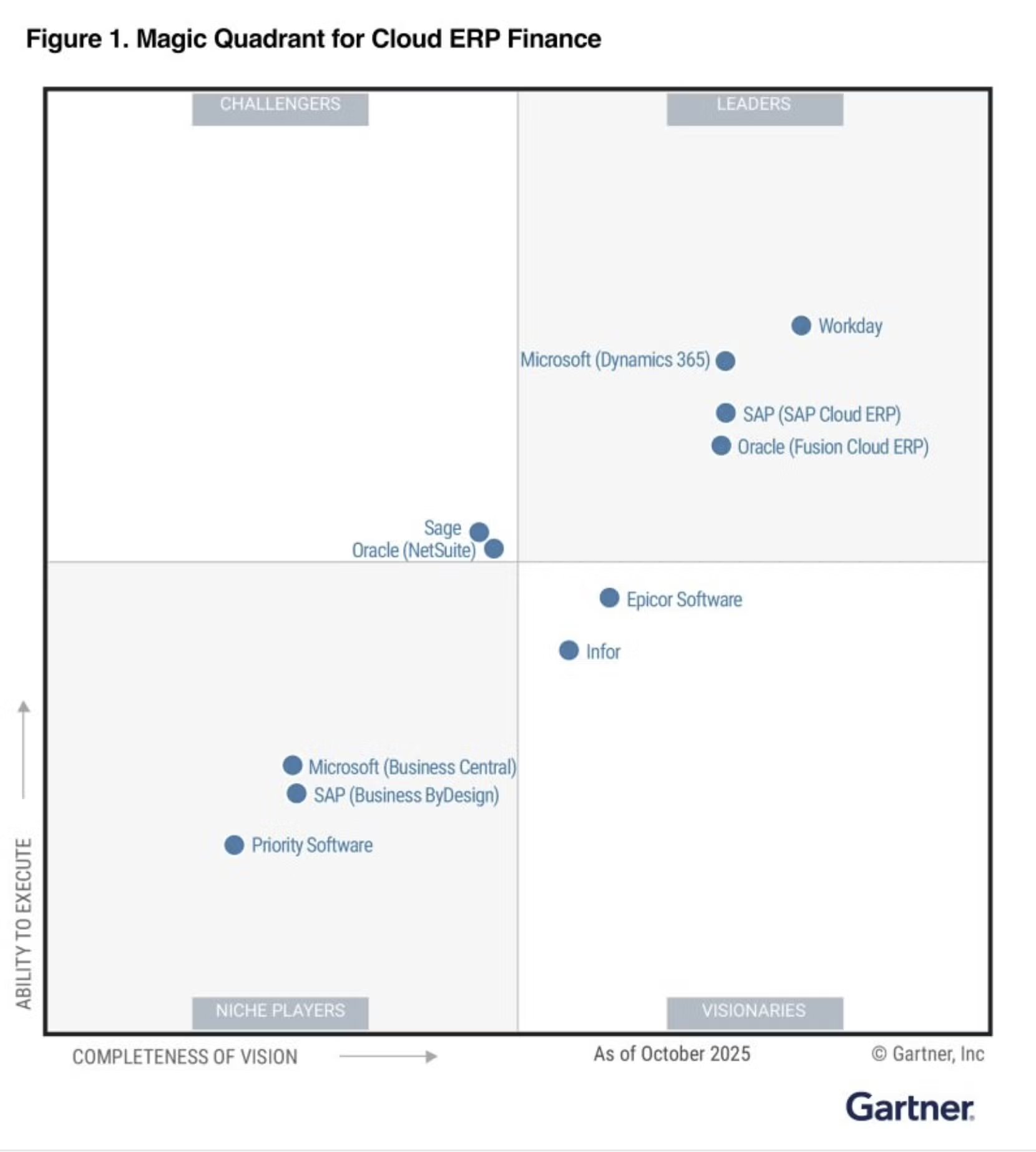
Microsoft, A Leader in the Magic Quadrant for Cloud ERP

Product-centric organizations are increasingly adopting cloud ERP platforms to standardize operations and drive intelligent automation. The 2025 Gartner® Magic Quadrant™ recognizes Microsoft as a Leader for its ongoing innovation and proven ability to support scalable, composable transformation across finance and operations.

The Total Economic Impact™ of Microsoft Dynamics Supply Chain

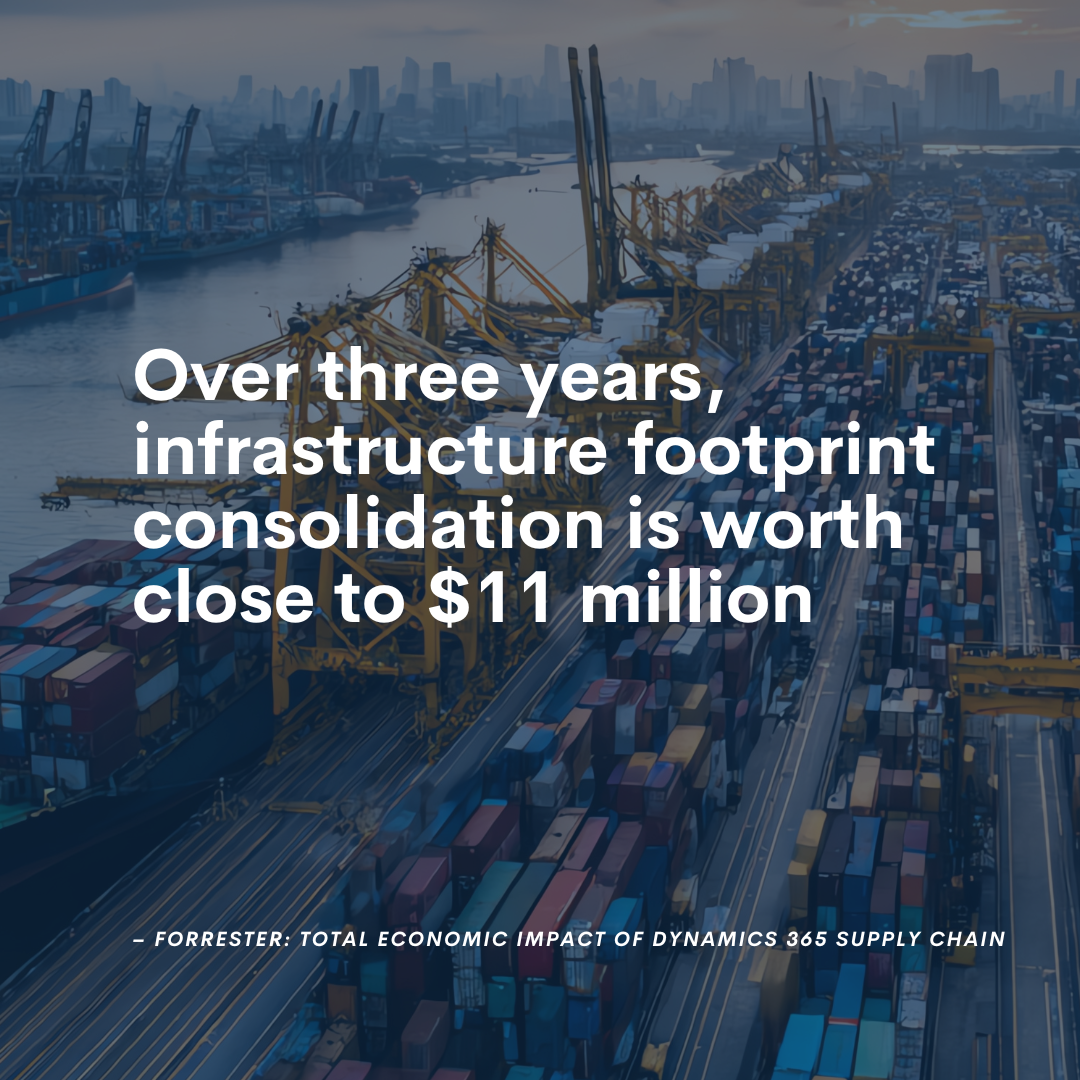
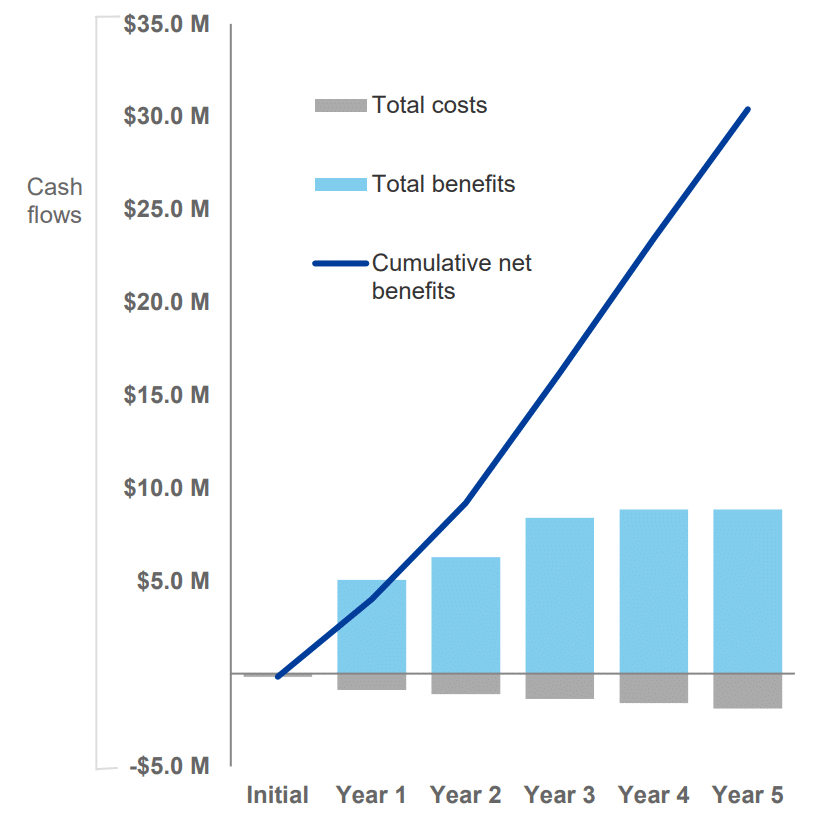
Microsoft Dynamics 365 Supply Chain Management addresses key supply chain challenges. These include limited visibility, adapting to changing customer demands, outdated systems, and disruptions. The solution enhances visibility across the supply chain network, enabling better planning, agility, and asset uptime optimization, ensuring smooth operations even during disruptions. Forrester Consulting conducted a Total Economic Impact™ (TEI) study to assess the potential ROI of deploying Dynamics 365 Supply Chain Management. The investment led to significant benefits, including:

  • Increased production volume capacity by 10% to 15% due to faster time-to-market.
  • Enhanced operational efficiency with a 2% to 3% reduction in unplanned machine downtime, worth over $1.5 million over three years and 500 manufacturing machines.
  • Increased developer productivity by 10% to 50%, reallocating developer time for higher-value tasks.
  • A 5% boost in revenue attributed to improved product quality, translating to more than $6.8 million in three years.
  • Infrastructure footprint consolidation of 35% to 65% by shifting from on-premises to cloud solutions, saving close to $11 million over three years.

The Total Economic Impact™ of Microsoft Dynamics Finance

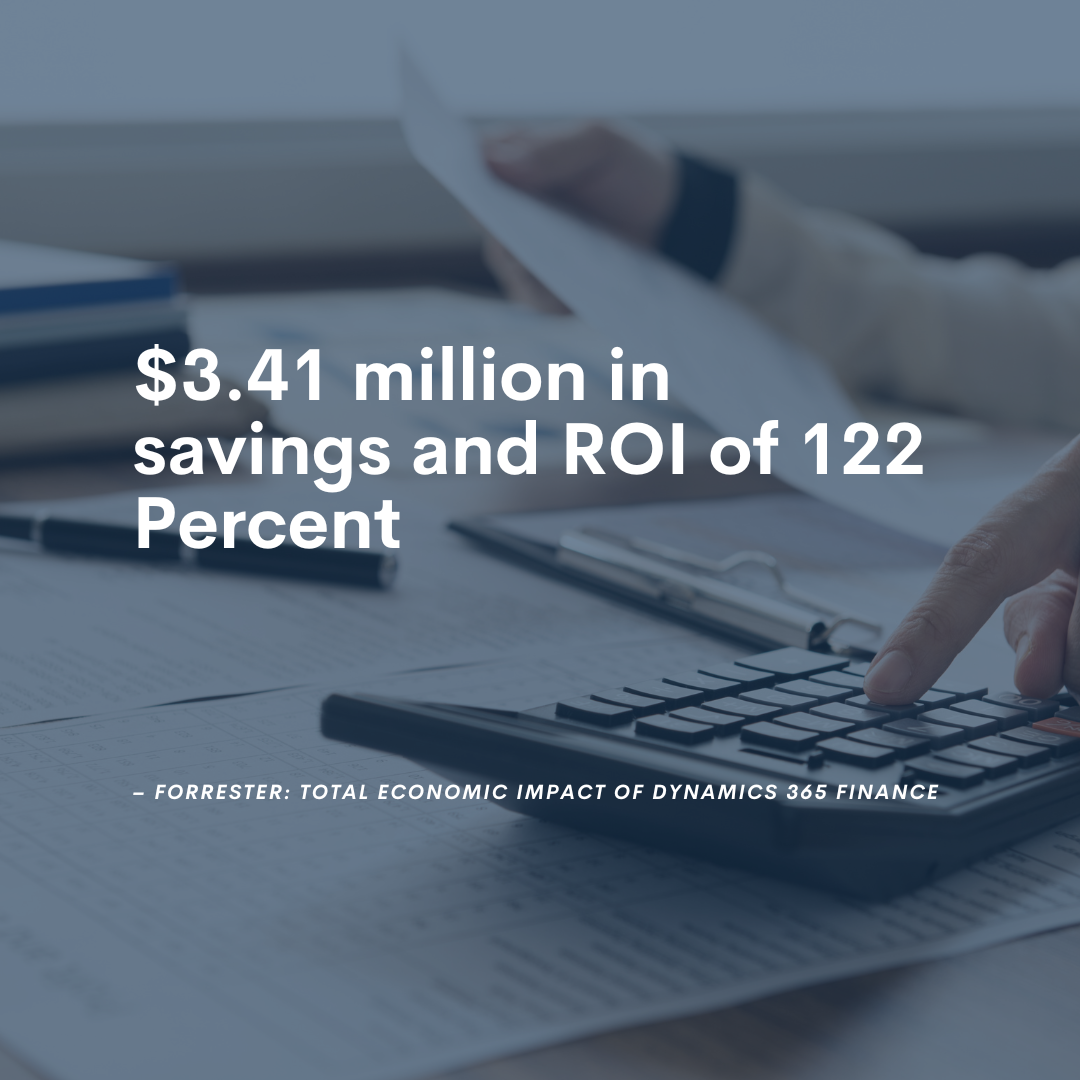
Microsoft commissioned Forrester Consulting to conduct a Total Economic Impact™ (TEI) study and examine the potential return on investment (ROI) enterprises may realize by deploying Microsoft Dynamics 365 Finance. The purpose of this study is to provide readers with a framework to evaluate the potential financial impact of Dynamics 365 Finance on their organizations.

To better understand the benefits, costs, and risks associated with this investment, Forrester interviewed four representatives with experience using Dynamics 365 Finance. For the purposes of this study, Forrester aggregated the interviewees’ experiences and combined the results into a single composite organization that is a retail and wholesale organization with 120 finance personnel and revenue of $750 million per year.

Above Average ROI from Dynamics 365

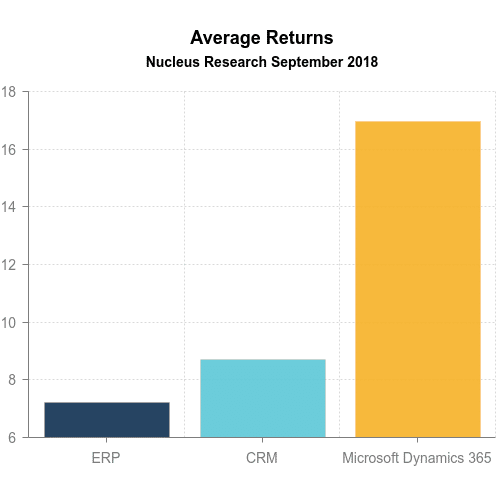
In analyzing the results of Microsoft Dynamics 365 deployments, Nucleus found that for every dollar spent, companies realized an average of $16.97 in returns. This is significantly higher than the average for both enterprise resource planning (ERP) and customer relationship management (CRM), which deliver, on average, $7.23 and $8.71 respectively. Nucleus found that companies taking advantage of Microsoft’s investments in cloud and usability, as well as integration and analytics, were able to achieve significant returns by increasing productivity and revenues and reducing costs. Microsoft’s integration of business capabilities such as ERP, CRM, and HCM with Office 365, Power BI, Power Platform, and Azure offer even greater value than the industry averages and as Microsoft makes further investments in integration and innovation, customers will benefit from the additional value provided by the cloud platform.

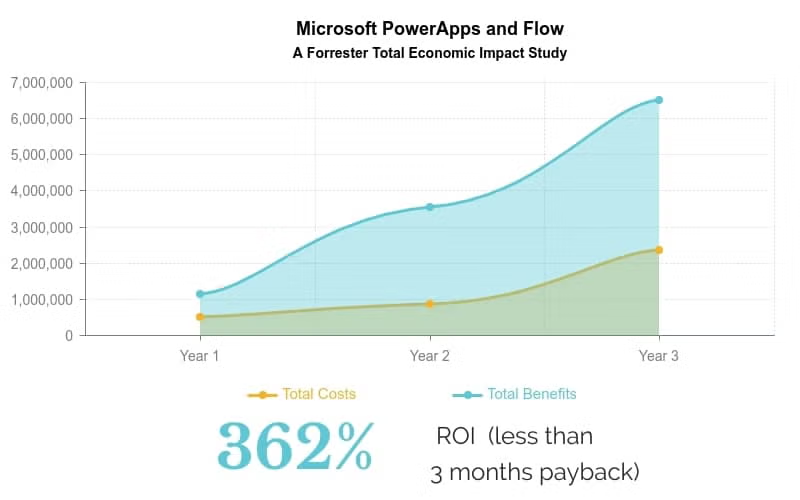
The Total Economic Impact™ of Power Apps

Adopting Power Apps can transform a company’s IT function from a blocker to an enabler. One interviewee in the Forrester Total Economic Impact Study said: “We can now build once and deploy to different places….We can now make changes on the fly and support a very dynamic business.” Benefits included:

  • 74 percent less cost to develop an application
  • 188 percent ROI over 3 years, with a net present value of $6.1 million
  • Average payback period is less than 6 months

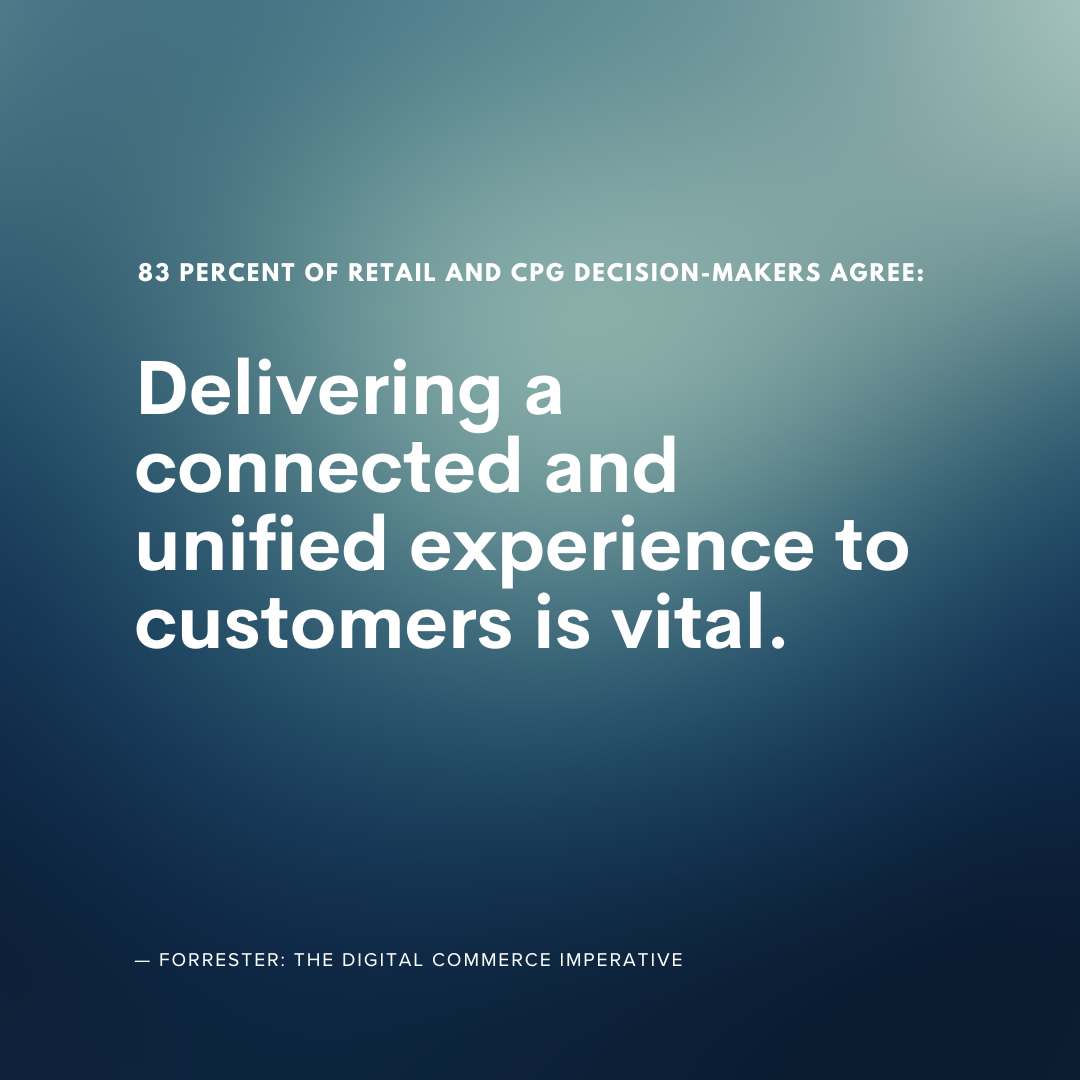
The Digital Commerce Imperative

A staggering seventy-six percent of retail and CPG decision-makers agree that improving digital commerce capabilities is their most urgent business priority. And yet for many organizations running on legacy or disparate systems, this goal is far out of reach. Microsoft commissioned Forrester to evaluate how retail and CPG companies are approaching digital commerce improvements today. In this thought leadership report, read key insights about the state of the retail and CPG industries in a post-pandemic world, and how technology leaders plan to invest to make true unified commerce a reality.

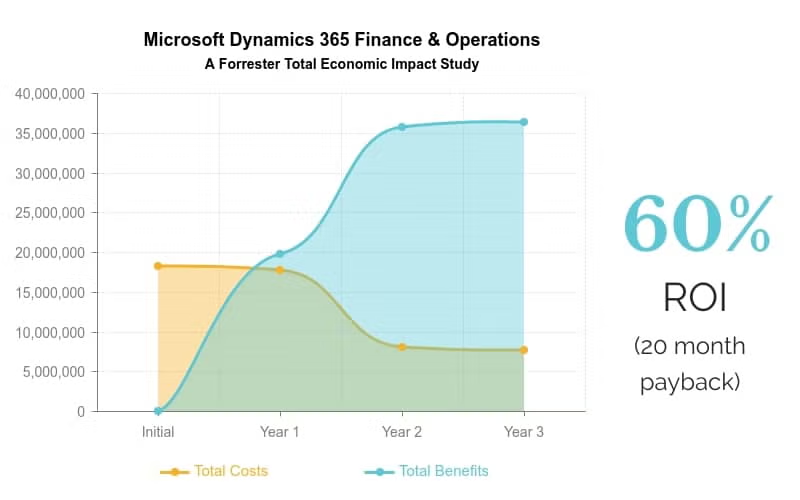
The Total Economic Impact™ Of Microsoft Dynamics 365 For Finance And Operations

Cloud simplicity, gained agility, improved user adoption, and enhanced security were a few of the benefits of Microsoft Dynamics 365 Finance and Operations. The quantitative benefits over a three year period included:

  • Increased wholesale revenue by 3 percent, retail revenue by 4 percent and decreased excess inventory and shrinkage by 10 percent
  • Operational efficiencies reduced cost of goods sold by 10 percent and improved gross margin by 2.4 percent
  • Employee productivity gains reduced shop floor staffing by 6 percent, increased finance productive by 20 percent, and increased sales productivity by 4 percent
  • Total benefits resulted in a 60 percent ROI and a 20 month payback period, including legacy license, maintenance, hardware, and admin cost avoidance

The Total Economic Impact™ of Microsoft Dynamics Commerce

Dynamics 365 Commerce provides a seamless shopping experience across physical and digital channels. Customers using a network of disparate and inflexible legacy solutions stand to save significant time and money by moving to an integrated omni-channel solution like Commerce. Forrester’s Total Economic Impact study of Dynamics 365 Commerce found:

  • Improved inventory management to the tune of $3.7 million
  • Saved $1.9 million through decreased training time
  • Increased brick and mortar sales by $1.5 million
  • 25 percent eCommerce sales uplift
  • Payback period of only 17 months

Microsoft Security a Leader in 5 Magic Quadrants

Gartner has named Microsoft Security a Leader in five Magic Quadrants. This is exciting news that we believe speaks to the breadth and depth of our security offerings. Microsoft was identified as a Leader in the following five security areas:

  • Cloud Access Security Broker (CASB) solutions
  • Access Management
  • Enterprise Information Archiving
  • Unified Endpoint Management (UEM) tools
  • Endpoint Protection Platforms

The Total Economic Impact™ Of Microsoft Azure IaaS

Microsoft commissioned Forrester Consulting to conduct a study to examine the potential return on investment (ROI) enterprises may realize by shifting some or all their management and operations from on-premises, hosted, and outsourced implementations to Azure’s infrastructure-as-a-service (IaaS) offering. Benefits included:

  • Improved production efficiency
  • Reduced datacenter, IT resource, and outsourcing costs
  • Easier and faster software and hardware management (such as patching and support)

A Platform for Today, Tomorrow, and Decades from Now

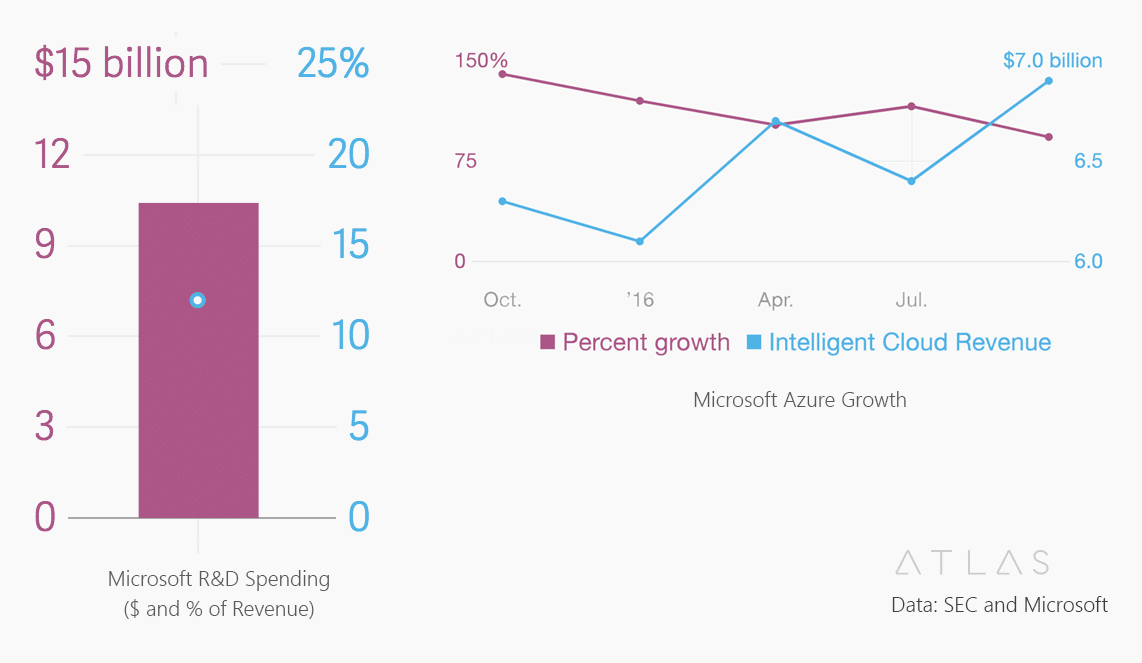
Microsoft offers a complete platform at a tremendous value. When you consider the billions of dollars invested in research and development, cloud growth, and long term viability, an investment in Microsoft makes long term sense.

Ready to learn more about what Dynamics 365 can do for your business?

Virtual Warehouse

Virtual Warehouses Best Practices

Are they ever a good idea for inventory management and fulfillment?

As the SVP of Global Business Development for Sunrise Technologies, Cem Item serves as a trusted advisor to C-level executives running large global enterprises. He conducts corporate business strategy engagements and digital transformation workshops around the world. With over 20 years of consulting experience, Cem specializes in the textile, apparel, footwear, home furnishings, consumer goods manufacturing, and retail industries.

Warehouse data tells a story

Data tells a story about how a company runs its business. The warehouse table in particular — this core entity reveals so much about how a company manages its inventory. We’re fascinated by the creativity we see and how customers utilize their inventory data in so many ways.

A common setup: virtual warehouses

One way customers can manage inventory is by setting up virtual warehouses. This is when a warehouse that doesn’t exist in physical space is created in their inventory management system, and inventory is added. Virtual warehouses are a technique used to segment inventory. Think of it as “setting aside” a portion of your product for VIP customers or certain channels. Virtual warehouses aren’t necessarily a bad thing – if an important customer, region, or channel made an early commitment to your product, you definitely want to make sure that product is available to them. For single-channel brands or businesses with simple supply chains, virtual warehousing is a perfectly fine way to manage inventory, and a good business practice. But for omni-channel brands, or global organizations selling product in multiple countries, using virtual warehouses to segment inventory can cause problems.

How virtual warehouses cause problems in the supply chain

Problems start to happen when you set up dozens of virtual warehouses in the system to serve different channels, regions, and retail stores. Even though the warehouses are virtual, you still must deal with the same inventory management issues that crop up just like in a physical warehouse. There are overages and shortages. Demand fluctuates. Product that you “set aside” for your customers and channels changes, constantly, and now you must keep up with every warehouse you created. Different operational segments of the business may hide inventory from another, so they can ensure their fulfillment requests are met. It’s not uncommon for us to see a single warehouse storing product, yet the ERP system has four separate virtual locations. How can you fulfill orders from warehouses that don’t exist?

Fixes for virtual warehouses – that actually cause more problems

When businesses start to have these problems with virtual warehouses, they come up with a brilliant solution – virtual transfers! These cause their own sets of problems, though. When this happens, you’re moving too far away from the accurate, real-life understanding of your inventory. To fix this, companies ask their IT departments to write specific algorithms to automate these virtual transfers, which eats up more time and money. And all the while, the brand still must keep fulfilling orders and allocating product. What started out as a simple way to make every channel happy becomes a twisted nightmare of complex rules and business logic. There are also third-party solutions you can buy and implement to make virtual warehouse management easier. But at the end of the day, these solutions don’t fix the core problem: your virtual house inventory doesn’t match your physical inventory, and it’s hard for the business to make good decisions regarding fulfillment, allocation, and how to manage the supply chain.

The solution? Get rid of virtual warehouses

There is a solution for this virtual warehouse madness and prioritizing where inventory gets allocated. An intelligent soft allocation system can dramatically improve omni-channel inventory management. Soft allocation does this by pegging inventory to segments based on demand and supply from a single inventory point (aka a single warehouse). Instead of automating virtual transfers just to balance out inventory inaccuracies, soft allocation is configurable as demands change, with no complex rewriting or rules or algorithms. Users can prioritize inventory, while pulling from a single pool and maintaining global visibility across the entire system.

Frequently asked virtual warehouse questions

Soft allocation is the way to go. By keeping inventory transparent, you keep the supply chain moving quickly. Solutions can give you the flexibility to hard allocate once you’re ready to ship, but up until that point, you’ll want to be able to move orders around fast, without unnecessary data entry or manual processes.

We don’t consider virtual warehouses a best practice. For one thing, there is nothing fast about virtual warehouses. Once you start messing around with virtual transfers and virtual overages and shortages, you’ve moved too far away from reality, and your users are going to waste a lot of time trying to make your imaginary warehouse look right. At Sunrise, we advocate for having what’s in your system match your physical inventory, sticking as close to reality as possible.

Theoretically, yes, although it’s possible to put systems in place to prevent that. Even with extra business logic, though, solving one problem for virtual warehouses won’t fix everything that’s wrong with using them in the first place. Soft allocation prevents negative inventory from ever being an issue.

If your brand sells across multiple channels like retail, eCommerce, and wholesale, or they sell in multiple regions or countries, soft allocation is the way to go. The more complex an organization, the smarter it is to keep all the inventory in one big pool. It seems counterintuitive at first, but when done correctly, soft allocation ensures you can meet fulfillment demand and have an accurate, real-world view of your inventory across all your channels.

See how Dynamics 365 handles inventory management

Are you interested in learning more inventory best practices? Would you like to a see a modern, streamlined allocation solution that gives you both flexibility and accuracy? Contact Sunrise today!

Product attributes: best practices for product management in a new ERP deployment

Product Attributes a Mess in Your Old ERP?

Follow these best practices to straighten out hard and soft product attributes in your next ERP deployment

As the SVP of Global Business Development for Sunrise Technologies, Cem Item serves as a trusted advisor to C-level executives running large global enterprises. He conducts corporate business strategy engagements and digital transformation workshops around the world. With over 20 years of consulting experience, Cem specializes in the textile, apparel, footwear, home furnishings, consumer goods manufacturing, and retail industries.

So, you’re embarking on a new ERP implementation. It’s a new beginning, a chance to reevaluate, reorganize, and revitalize your business processes. And for consumer brands and retailers, product management is the most important piece of the ERP puzzle.

When starting a new ERP implementation, it’s absolutely critical that you think about how you’ll handle product attribution in your new system. For many companies, it’s a mistake to bring over the old product data structure.

Instead, take this as an opportunity to clean up messy, disorganized data and define a product hierarchy that frees your team from unnecessary and confusing product management.

Product attributes: the lifeblood of your brand

Product is the heart of a brand. Whether you sell jackets or handbags or table lamps (or all these things and more), you must define the type, colors, sizes, and many other dimensions for each product. A company’s product data structure is one of the most complex parts of an ERP system. Almost every area of your business will bring their own data and business logic to the product management party. It’s essential that you maintain clean and accurate data for your products to keep them moving through the system efficiently.

What are product attributes?

For those who don’t know: product attributes describe your brand’s, well, products. For those who are all too familiar: managing product attributes can be a pain, especially in a legacy system. Every time a brand debuts a new collection or starts selling a new category of goods, new attributes must be added to the ERP system.

What’s the best way to manage product attributes?

During a new ERP implementation, you have a rare opportunity to clean up your messy data and streamline your product management. Whatever data structure you decide on, you’ll have to live with for the next several years (or decades). Here’s the process we recommend for cleaning up your product hierarchy:

Step one: define your hard attributes

Hard attributes are characteristics that span your entire organization – examples are Brand, Gender, and Product Type. These are used by the business to sort and filter products. Hard attributes show up in the main forms and reports of a business. You will end up with a few of them.

Step two: define soft attributes

Soft attributes, on the other hand, are where you really slice and dice your product data. These are details that are specific to your product categories — think flammability for clothes, finish for furniture, material for handbags, etc.

Examples of hard attributes


  • Brand
  • Gender
  • Product type

…there will only be a few of these

Examples of soft attributes


  • Color
  • Finish
  • Flammability

…there will be a lot of these

The biggest mistake companies make in their product master data

We see this a lot with legacy systems: ALL the soft attributes, across every product category, are visible for every product.  Business users then get confused — why is Finish showing up for a jacket? Why is Flammability listed in the Footwear section? Am I supposed to maintain the water-resistance attribute for my furnishings products? It gets confusing and messy, fast.

Product hierarchies: an opportunity to clean house

It’s usually not a company’s fault that their product masters get so jumbled. Legacy ERP systems don’t handle multiple product categories very well, and people develop customizations and workarounds to get the info they need. Plus, the retail and consumer brands landscape has changed so much – an apparel company that implemented an ERP system in 1999 couldn’t predict that someday, that same company would evolve into a lifestyle brand selling handbags, shoes, accessories, and home décor.  Or that a company may acquire another brand that sells a completely different product, like furnishings, or cosmetics.

That’s where a modern, cloud-based ERP comes in: you need a system for handling many different categories, while minimizing confusion and extra work for product management. Adding a new product category should NOT require customizations to your ERP system.

ERP deployment considerations for product master data and attributes

The right ERP system can give you the correct product hierarchy to efficiently manage all your products. Microsoft Dynamics 365 makes it easy to define parent-child product relationships within categories. New soft attributes can be added quickly and attached to the relevant products in your hierarchy. Your users only see what they need to see, and their work is no longer crowded with irrelevant product data.

See how Dynamics 365 handles multidimensional inventory

Are you ready to simplify your product data structure? Want to learn more about how Dynamics 365 can efficiently manage your supply chain and revitalize your company? Get in touch with us today!

Evolve your ERP: Moving from on-premise to the cloud

Evolve Your ERP: Moving from On-Premise to the Cloud

If you’re wondering whether your company’s ERP solution has fallen behind the competitive curve, here’s your answer: More than likely, yes.

Current market research shows that over half of companies’ primary ERPs are at least 5 years old, a precariously long time for fast moving markets. As a result, more than 60% of businesses with at least one ERP solution still mostly rely on legacy on-premises systems.

The reality is that on-premises models are facing an increasingly uncertain future, and forward-thinking companies are behaving accordingly. Faced with an aging on-premise infrastructure, most companies with legacy ERP systems are turning to the cloud as the only viable option. Cloud ERPs have become the new normal.

ERPs are the lifeblood of most major businesses. Good platforms track everything from inventory to monthly close, which is why replacing or upgrading them should be approached with the appropriate amount of respect. When the stakes are high, being proactive is the smart approach.

Start Your Journey with Sunrise Today!

Whether you’re exploring your options for new business platforms, or ready to get started, we are trusted business partners for some of the world’s most well-known brands. With over 25 years of experience with the Microsoft stack, we can help you understand all the capabilities Microsoft has to offer.

Sunrise 365 certified for fashion: TEC report highlights

Fashion Extension Certified for Microsoft Dynamics 365

TEC Certification Report Highlights:
How Sunrise 365® compares to ERP fashion and retail solutions

Providing Enhanced Retail and Supply Chain Solutions for D365

We already knew Dynamics 365 and Sunrise 365® is a killer combo for brands and retailers. But we wanted a second opinion. Technology Evaluation Centers (TEC), a leading independent ERP software analyst firm, evaluated our Sunrise 365® Supply Chain and Retail Replenishment solutions and compared against their comprehensive model of ERP for Fashion and Retail. The verdict?

Sunrise 365 for Supply Chain and Retail Replenishment provides essential industry extensions for fashion and consumer goods brands. Here are the key highlights of TEC’s report if you are considering Sunrise 365 for Dynamics 365 and your business is in fashion, apparel, or footwear.

How Sunrise 365® works with Dynamics 365

Sunrise Technologies is the developer of application extensions for Microsoft Dynamics 365 for Finance and Operations (D365) that have been built to manage the unique needs of manufacturers, distributors, and retailers of apparel, footwear, textiles, home furnishings, and similar consumer products.

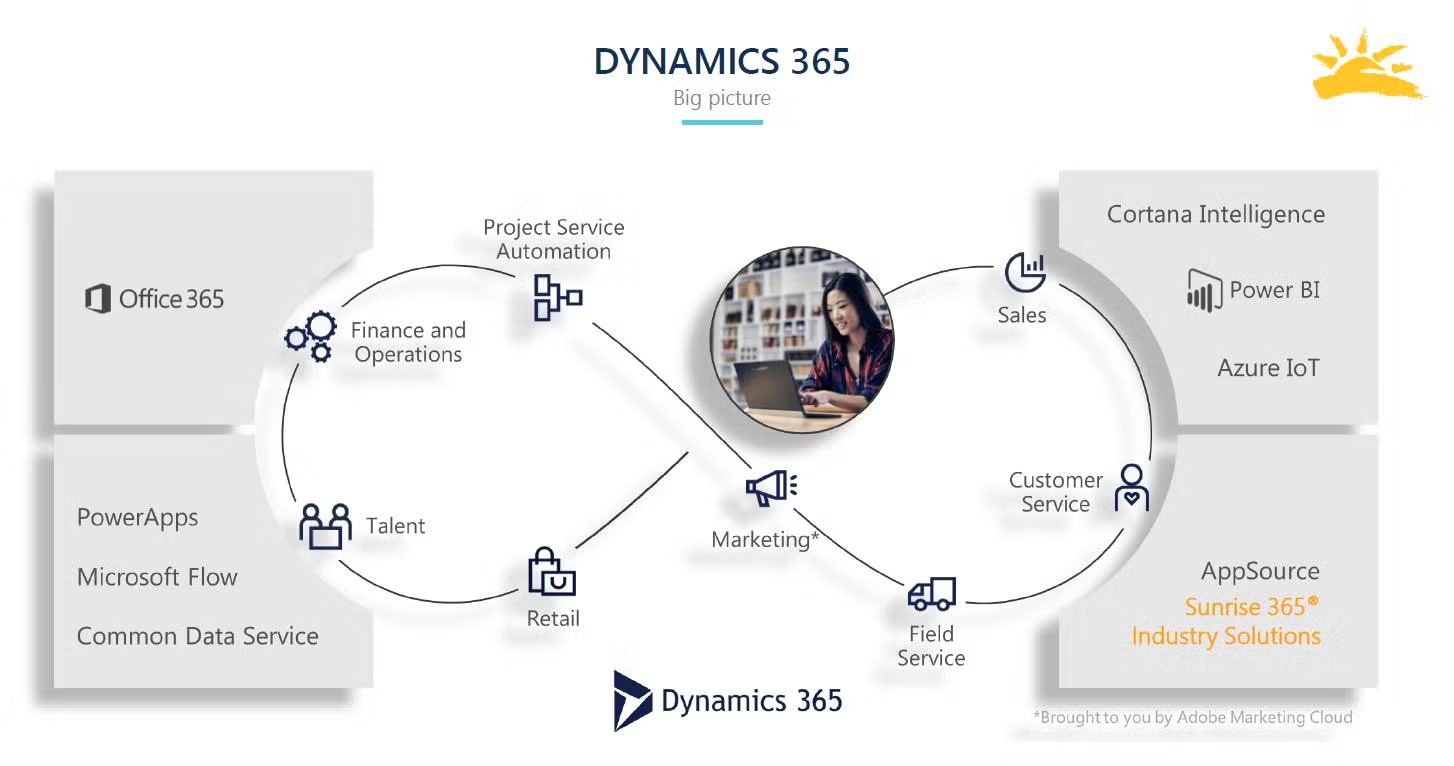
The Sunrise 365® Supply Chain and Sunrise 365® Retail Replenishment products bring enhanced capabilities to D365 that are especially important to these industries. These capabilities include fully integrating the product variations, multichannel management, and automated processing and control of complex allocation schemes across the entire Enterprise Resource Planning (ERP) application suite.

The Sunrise solutions extend the core Dynamics 365 application. Sunrise’s applications are seamlessly integrated into D365, so that users don’t have to know whether they are working in D365 or in the Sunrise applications.

Product extensions

Sunrise 365® adds scale management, global trade item number (GTIN) reuse automation, season management, stock-keeping unit (SKU) lifecycle, and the product lifecycle management (PLM) integration framework to D365.

  • Scale management: supports dual sizing and NRF color and size codes, making it easier to manage products across multiple markets
  • GTIN: automation and reusability tools save time and money
  • Season management: tools to manage styles, colors, and delivery restrictions for seasons
  • Hard attributes: additional attributes like brand, category, and class allow for more specific sorting, filtering, and reporting
  • SKU lifecycle: item statuses allow for greater inventory control and specificity across the entire system
  • PLM integration framework: Sunrise’s framework greatly reduces the time and cost of integrating D365 with a PLM system

Sales extensions

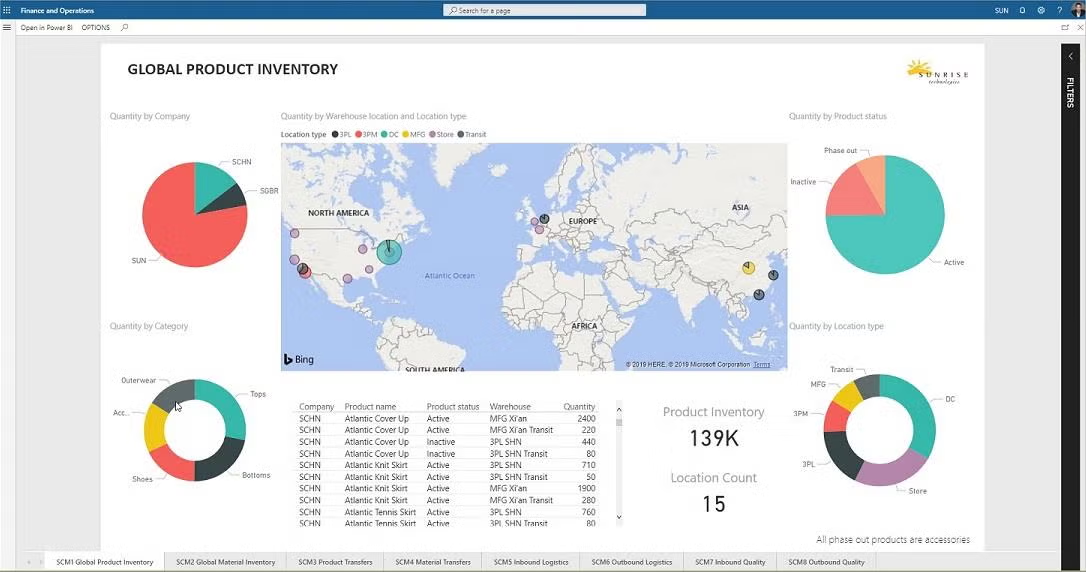
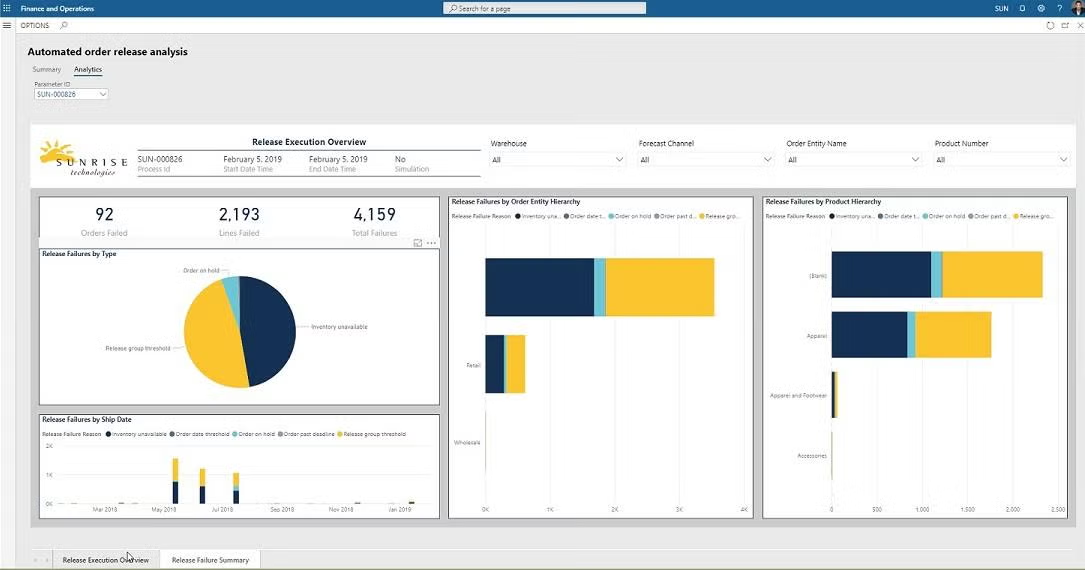
The Sunrise 365® Supply Chain extensions in sales include mark-for addresses, sales restrictions, sales cancellation log, sales order categories, sales order enhancements, bulk order management, and an automated order release. These extensions come with interactive, analytical dashboards that give users more insight into how products are flowing through the system.

  • Ship-to and mark-for addresses: allow orders to be earmarked for specific store
  • Sales restrictions: thresholds that restrict when an order can be released for shipment.
  • Sales cancellations: allow users to know more about why an order was cancelled.
  • Bulk order management: tracks orders and compares against a blanket or master order for all products over the course of a year or season.

Supply chain: where it all comes together

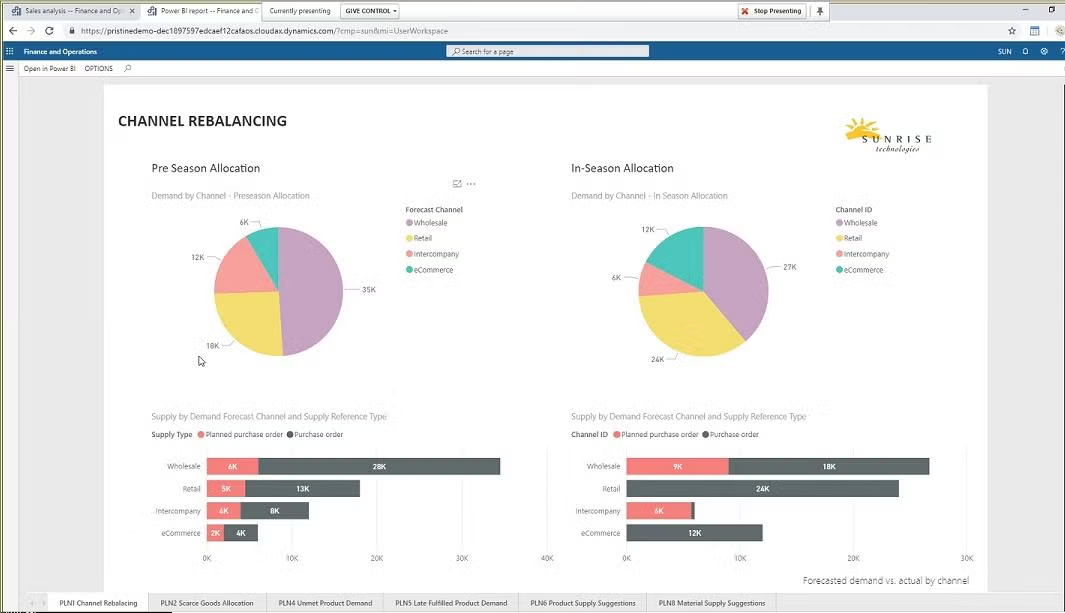
The supply chain extensions are where everything comes together. The tools in this area include support for forecasting, forecast netting, soft allocation, and supply chain analysis. Forecasts can be built that clearly define demand channels (e.g., web, wholesale, or retail). A planning workbench is not only a part of this extension but also a forecast integration framework for those who wish to work with other tools. Supply chain analysis adds other insights to business challenges such as channel rebalancing, scarce goods allocation, projected excess product inventory, unmet product demand, product supply suggestions, and product inventory projections.

One of the most impactful capabilities in Sunrise 365® Supply Chain is the ability to manage what Sunrise calls “soft allocation” on inventory. Soft allocations let a user determine how to flexibly balance demand sequences to supply sequences and ensure that the demand will be appropriately supplied.

This is different from the “hard” allocation process, which occurs natively within Dynamics 365 and is not as flexible at meeting the more fluid requirements of Sunrise’s customers.

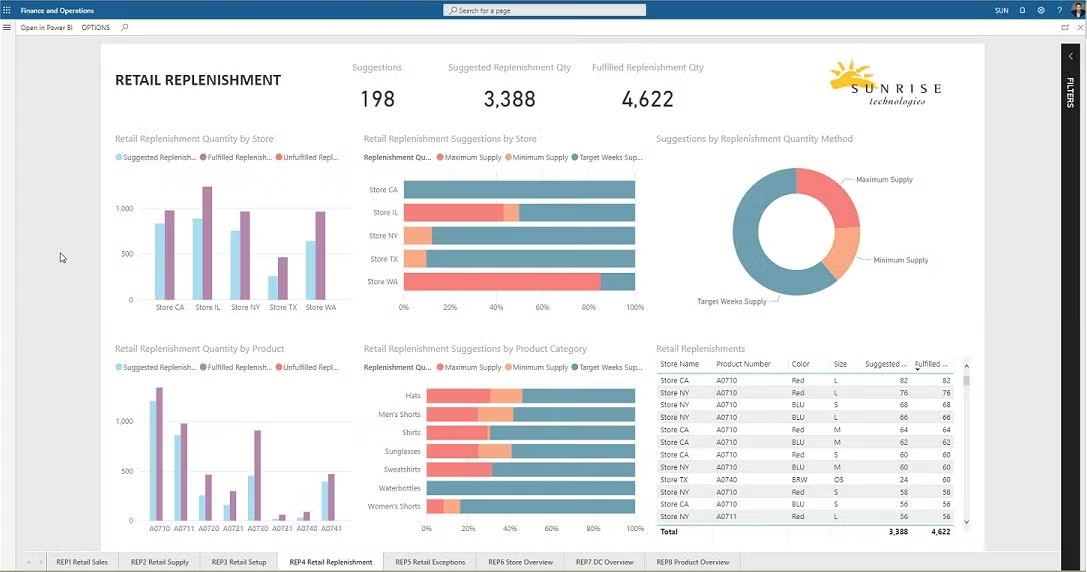
Sunrise 365® Retail Replenishment

Retailers need to stock the right products in the right stores at the right time. Sunrise 365® Retail Replenishment is a relatively new product created by Sunrise to meet the demand of its customers, who were coming to them and asking whether they could help them manage retail replenishment without the steep prices associated with a third-party solution. Most of the solutions on the market are very expensive on their own. On top of the software costs, the costs to integrate these solutions with D365 are very steep.

The Sunrise retail replenishment tool brings together the retail store replenishment settings and rules and the actual inventory levels from the POS locations, and then it produces the appropriate retail plans.

In conclusion...

Sunrise 365® brings great value, lowers the overall cost of ERP purchase and implementation, and brings faster deployment to its customers because of its tools and experience in these industries. Marquee customers such as Fila, Bioworld, and others rely on Sunrise to run their business. Anyone looking to purchase or upgrade their ERP system for these fluid consumer industries owes it to themselves to see what Sunrise can deliver for them.

Access the Fashion & Apparel Certification Report

Ready to take a deep dive into Sunrise 365? TEC’s full report shows you how Sunrise 365 stacks up against their comprehensive model for apparel and fashion ERP. If you want all the nitty-gritty details, check out the full report from TEC!

Sunrise 365 for Dynamics 365 is TEC certified for fashion, apparel and footwear

Sunrise 365 for Dynamics 365 is TEC Certified for Fashion, Apparel and Footwear

Sunrise is pleased to announce that Sunrise 365® for Supply Chain and Retail Replenishment has been evaluated and certified for Fashion and Retail by TEC. Technology Evaluation Centers (TEC) is a leading software industry analyst firm.

To achieve TEC certification, software solution providers must conduct a demo of its product and submit a detailed functionality questionnaire. TEC analysts compare the solution against known benchmarks and provide a detailed review of the software’s features.

To learn how Sunrise 365’s extensions make Dynamics and Sunrise a perfect fit for brands and retailers, download the report today!

Start Your Journey with Sunrise Today!

Whether you’re exploring your options for new business platforms, or ready to get started, we are trusted business partners for some of the world’s most well-known brands. With over 25 years of experience with the Microsoft stack, we can help you understand all the capabilities Microsoft has to offer.